
Holiday clashes are easier to prevent when requests, approvals and team availability are managed in one place. Holiday programme management software can bring leave requests, approval records and shared calendars together, while cloud-based records support more consistent handling of staff information. In the UK, most workers are legally entitled to 5.6 weeks of paid statutory holiday each year, according to the UK Government.
When staff leave is tracked across messages, spreadsheets and separate calendars, it can be difficult to see who is away and whether a programme has enough cover. A clear, shared process helps managers make informed decisions and gives staff a reliable view of their requests and remaining leave.
This article explains how software can help prevent holiday clashes, record approvals, update shared calendars and protect the privacy of cloud-based leave records. You’ll also learn what to look for when manual tracking starts to slow down your operation, and how to plan leave without losing sight of staffing needs.
Key Takeaways
- Make remaining leave and team availability visible so you can spot clashes before they disrupt programme staffing.
- Use a consistent approval process and shared calendar to keep decisions and upcoming absences clear.
- Recognise when spreadsheets and manual updates are creating extra work or fragmented leave records.
- Choose tools that fit your operation, and share absence information without exposing private reasons for leave.
Holiday clash and staff-shortage prevention
Clear leave records help managers spot conflicts before they affect programme cover. Consider holiday requests, staff availability and staffing needs together.
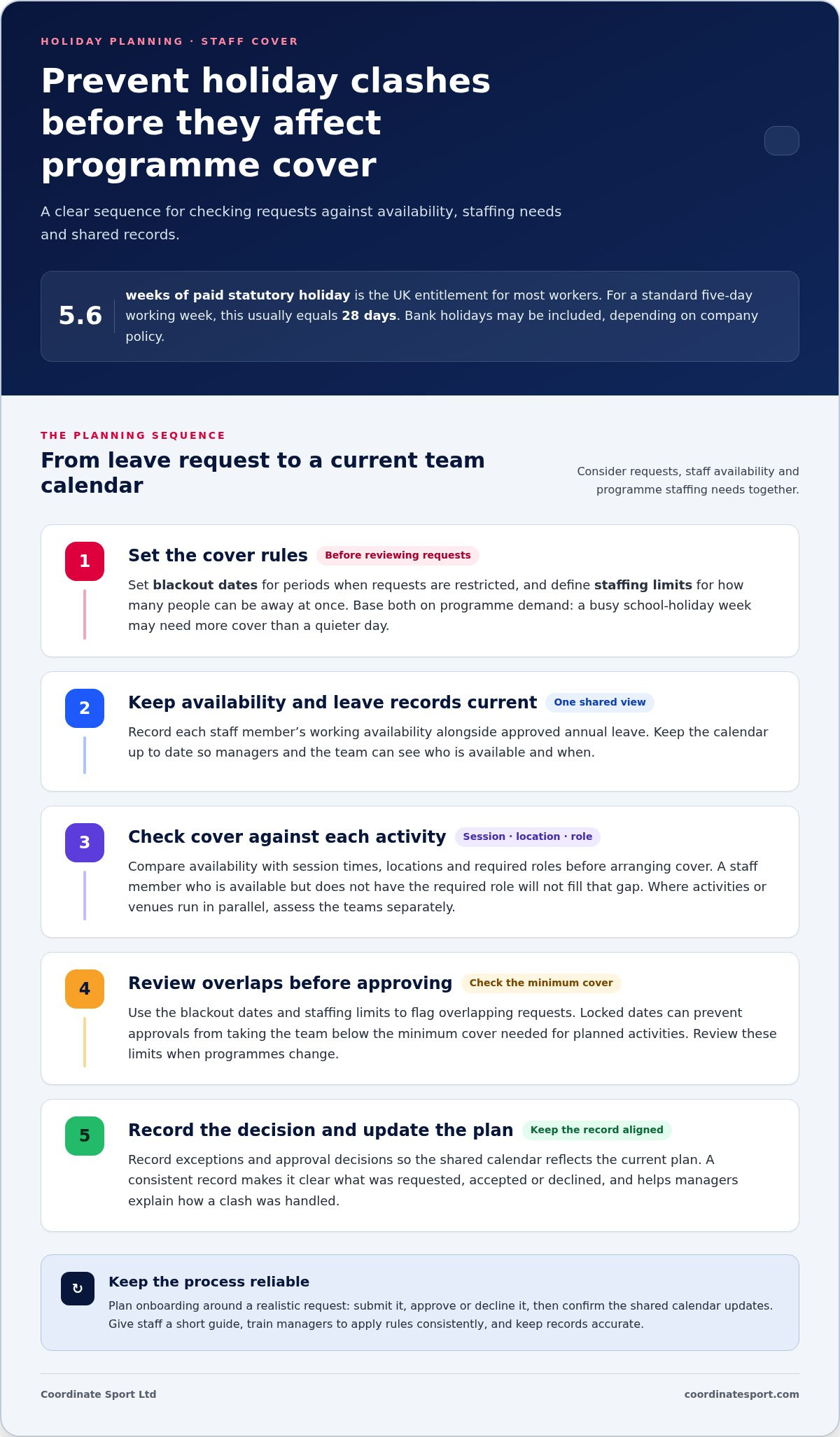
According to UK Government, most workers in the UK are legally entitled to 5.6 weeks of paid statutory holiday each year. According to UK Government, most workers are legally entitled to 5.6 weeks of paid statutory holiday each year; for a standard UK employee working five days a week, this usually equals 28 days. UK employers can include bank holidays within the statutory 5.6 weeks of paid annual leave, depending on company policy, according to UK Government.
Blackout dates and staffing limits
Blackout dates are periods when holiday requests are restricted, while staffing limits set how many people can be away at once. Set both against programme demand: a busy school-holiday week may need more cover than a quieter day. A management system can record these rules and flag overlapping requests, helping managers review conflicts before approving leave.
Availability-based staff scheduling
Availability-based scheduling uses each staff member’s recorded working availability alongside approved annual leave. Managers can compare this information with session times, locations and required roles before arranging cover. For example, if an activity needs someone with a particular role, another available staff member without that role won’t fill the gap. Keep availability current and share the calendar with the team.
Staffing levels and locked dates
Staffing levels define the minimum cover needed for planned activities; locked dates prevent approvals from taking the team below that level. Set limits by session, as parallel venues or activities may need separate teams. Review them when programmes change, and record exceptions and approval decisions so the calendar reflects the current plan.
Software options differ: compare whether booking, payment records and attendance sit in one workflow or require separate tools. Voucher and Tax-Free Childcare support depends on payment capabilities, so distinguish scheme acceptance from standard online fee collection. Integrations also differ: accounting, email and payment records may connect directly or need separate updates.
Plan onboarding around a realistic example: submit a request, approve or decline it, then confirm that the shared calendar updates. Give staff a short guide and train managers to apply blackout rules and staffing limits consistently, while keeping records accurate.
Signs a business may have outgrown manual holiday tracking
Manual leave management becomes harder to control when requests sit in inboxes, spreadsheets and separate calendars. In an example business with 30 employees, managers process 180 holiday requests during the year. Each request needs a clear status, decision and record. If updates are missed, staff may act on outdated balances or assume leave is approved when it isn’t.
Holiday and absence tracking
One sign is that staff holiday takes longer to reconcile than to approve. Manually calculating and updating one employee’s paid time off balance can take up to 47 minutes. Digital records can bring requests and balances together, making it easier to see what has been booked and what remains. Set consistent categories for annual leave, sick leave, unpaid leave, TOIL, compassionate leave and parental leave. This helps managers distinguish absence types instead of forcing every entry into one holiday total.
Absence tracking and reporting
Another warning sign is that managers can’t answer basic questions without checking several files. A shared team calendar shows who is away and when, while reports can reveal recurring gaps by programme or date. For example, a rule limiting simultaneous absences within a department is difficult to enforce when approvals are buried in separate email threads. Keep the policy and decision record alongside the calendar so managers can explain how a clash was handled.
Watch for repeated corrections, late balance updates and uncertainty about who approved a request. These patterns suggest that the process relies too heavily on manual memory. A digital system can keep records and reports in one place for future staffing plans. It can also help managers identify staff who have taken little leave and address unused entitlement before an end-of-year rush. Use a single record for requests, decisions and absences, then review it before planning the next programme schedule.
Cloud-based holiday records and data security
A cloud-based leave planner keeps requests and decisions in one shared record instead of scattered spreadsheets. Staff can submit requests through a central process, while managers review dates and update the planner. This gives authorised colleagues a current view of availability without circulating multiple files. One approved record makes it clear what has been requested, accepted or declined.
Cloud storage alone doesn’t protect sensitive information. Set access by role: staff should see their own remaining entitlement, while managers need the details required to arrange cover. Colleagues may need to know that someone is unavailable, but not the private reason. A shared calendar, for instance, can show an absence without revealing whether it relates to a medical appointment or another sensitive matter.
Keep records focused. Store dates, request status, decisions and relevant handover details, rather than personal explanations that scheduling doesn’t require. Decide who can view, edit and approve entries, then remove access when someone changes role. Managers should be able to see a request’s status and decision history, while other staff see only the availability needed for planning.
Connect leave administration to payroll through a controlled handover. Before a pay run, compare approved dates with recorded absences, then pass on the information payroll needs. This helps reduce the risk of an unapproved request being treated as agreed leave or a change being missed in a separate spreadsheet. Set out how to correct an entry, including who made the change and why.
Make security part of everyday practice: train staff to submit requests through the agreed channel, avoid sharing files by email and review access when responsibilities change. A cloud record works best when everyone follows the same process. Share availability widely enough to plan cover, but restrict personal leave details to those who need them.
What are the best holiday programme management software options in the UK?
The right choice depends on whether your main pressure is staff absence, participant bookings or the handover between them. Compare options against real tasks, such as checking staff availability, managing registrations and taking payments. A tool that handles one workflow well may still leave another dependent on spreadsheets.
Dedicated leave management tools focus on staff requests, balances, approvals and absence calendars. They suit organisations that need to formalise annual leave and see team availability, but may not cover programme registration or participant payments. Map your approval process first, then check whether the system supports the leave categories and reports managers use.
General HR platforms can manage leave alongside wider people administration. They may suit organisations that already use an HR system for staff records. Consider how the leave calendar supports operational scheduling: managers planning activities may need to see availability alongside sessions, locations and required roles, rather than in a separate record.
Activity and booking platforms focus on running programmes, handling registrations and coordinating participant information. Coordinate Sport Ltd offers sports CRM and booking software, including online booking and registration for holiday activity programmes. It is relevant when bookings and activity administration are priorities; organisations seeking only a dedicated employee leave tracker should compare tools designed specifically for that task.
Assess each option using the same practical scenario: a staff member requests leave during a scheduled programme, a manager records the decision, and the team checks the resulting cover. Then test how the platform handles registrations, payments, attendance and reporting, as well as any connections your process requires. Separate confirmed functions from assumptions, and favour a clear workflow over a long feature list.
For programme booking and activity administration, explore Coordinate Sport Ltd booking software as one option. Match the platform to the operational job you need it to do, then establish whether staff leave requires a separate dedicated process.
Coordinate Sport: Sports CRM and booking software
Coordinate Sport brings together sports CRM and booking software for activity providers managing holiday programmes. Its Activity Management Application supports programme administration, while the Sports Activity Provider Staffing Application supports staffing workflows. Online booking and registration covers holiday activity programmes, sessions, courses, clubs, camps and events.
It’s a natural next step when your operational challenge goes beyond tracking staff leave to coordinating activities and participant registrations. Use the platform to manage programme bookings alongside staffing workflows, with each process serving a clear purpose. Leave requests and approvals should follow the process your organisation has established.
To explore how Coordinate Sport could support your programme operations, visit coordinatesport.com.
Set your next programme up for smoother planning
Use your next planning cycle to define what staff need to see, what managers must approve and how activity cover will be coordinated. These decisions give you a practical way to assess holiday programme management software: does it support how your team works without adding another disconnected process?
Coordinate Sport offers sports CRM and booking software, a Sports Activity Provider Staffing Application and an Activity Management Application. These tools support organisations coordinating programme operations alongside staff workflows. Choose the next step that fits your priority, whether that means reviewing staffing processes or bringing activity management into a clearer structure.
Contact Coordinate Sport to discuss your programme requirements. Take the next step towards a more organised operation, with a process your team can put into practice.
Frequently Asked Questions
What is holiday programme management software and who uses it?
Holiday programme management software helps organisations organise programme administration using digital tools. Sports clubs, activity providers and organisations running holiday activities can use it to coordinate registrations, participant records and staff planning. For example, an administrator can use booking records to prepare a session register, while a manager reviews operational information. The right setup depends on whether the main need is bookings, workforce coordination or both.
What features should holiday programme management software include?
Choose features that support your actual operating workflow. A provider managing bookings may need online registration, payments, customer accounts and digital registers; a team coordinating activities may also need scheduling, staff records and reporting. Consider waiting lists and messaging if you use them to manage enquiries or communicate programme details. Map a typical booking from registration through attendance, then identify which tasks still rely on manual updates.
What UK safeguarding, data protection and Ofsted requirements apply to programme software?
There isn’t one software checklist that establishes compliance for every UK activity provider. Applicable safeguarding, data protection and Ofsted considerations depend on the service and how it operates. Treat software as an administrative tool, not proof that an organisation meets its responsibilities. Before using it, define who can access participant records, what information staff need for their roles, and how sensitive details are handled and shared.
How should an organisation choose and set up a system?
Start by identifying the operational problem you want to solve, such as duplicated registrations or disconnected staff records. Compare platforms against a real example, from a parent’s booking to the session register staff use. Agree who owns each record, who can change it and how staff will learn the process. Test the workflow with your team and address gaps before relying on it for live administration.
What are the risks of using holiday activity software, including data security and downtime?
Key risks include incorrect access settings, outdated information and losing access during a service interruption. For example, a staff member using an old register may miss a late change. Limit access to relevant roles, keep records current and establish a fallback for essential session information if the system is unavailable. Make sure staff know whom to contact and how to record changes during a disruption.