

An activity booking and payment system can connect reservations to available inventory, so each booking updates the calendar and captures the details needed to manage the session, resource or activity. It can also send booking confirmations by email or text. The key is linking each booking option to the right availability, capacity and payment process.
That connection matters when you coordinate sessions, equipment, staff or places on a programme. A booking system should do more than accept reservations: it should organise availability and give customers a straightforward way to choose an activity and pay.
Here’s how booking software connects reservations with availability, supports online and in-person payments, and serves different activities. You’ll also find practical criteria for choosing a system that suits the way your organisation works.
Key Takeaways
- Link each booking option to the relevant stock, space or capacity to keep availability aligned with reservations.
- Choose payment processes that suit both online checkout and in-person transactions, and fit how your customers book.
- Match the booking setup to the job, whether you manage appointments, shared resources, sessions or events.
- Compare how different industries organise bookings, then shape your system around your activities and operational needs.
Does the system integrate booking with my inventory?
Yes, if each booking option is linked to the relevant stock, space or capacity. An activity booking and payment system can update its calendar, record reservation details and send confirmations by email or text. For example, when a session reaches its configured limit, the system can close that time slot to further bookings.
Set up each activity, schedule, capacity and shared resource, then place a test booking to check that availability updates correctly. For recurring sessions, review each date so exceptions, such as a cancelled session or unavailable room, don’t leave places open by mistake.
Capacity and waitlist behaviour depend on the limits and rules you configure. A waitlist can record interest after a session fills, helping staff offer a place if someone cancels. Make the response deadline clear, and update the reservation record when a customer accepts.
Automated reminders can be sent a few days before a reservation. Include the activity, date, time and any useful joining details. Customers who prefer Google Calendar can add confirmed dates to their diary. An activity booking and payment system can also connect payment status with the relevant reservation, helping staff distinguish paid bookings from amounts still due.
For UK bookings, show the total price, key terms, cancellation conditions and refund process before payment. The Payment Card Industry Data Security Standard (PCI DSS) is the named standard for payment card data security. Limit access to customer and payment records to staff who need it.
Security risks include unauthorised account access and unnecessary exposure of personal information. Two-factor authentication adds a sign-in step, commonly using a code sent to a customer’s phone or email. Review staff permissions and account access as part of routine system administration.
Zoho Bookings automation and CRM integration can link appointment details with customer records. Map booking information to the relevant CRM fields, then test a reservation, an update and a reminder. This helps staff manage changes without entering the same customer details into separate records.
Online and in-person payments
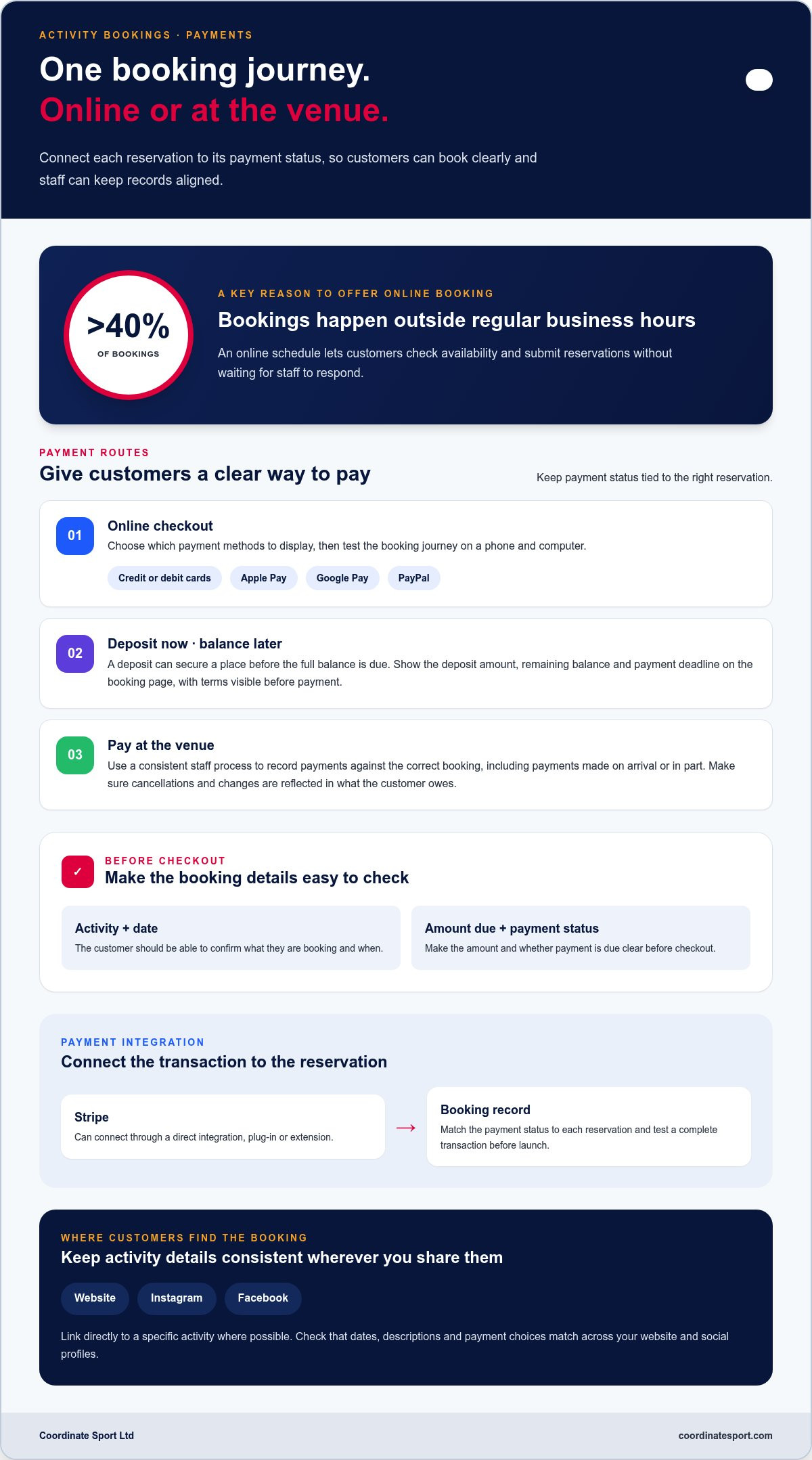
Give customers a clear way to pay when they book. Online checkout may accept credit or debit cards, Apple Pay, Google Pay or PayPal. Choose the payment methods to display, then test the booking journey on a phone and computer. Before checkout, customers should be able to see the activity, date, amount due and payment status.
Deposits can suit activities where a place needs to be secured before the full balance is due. Show the deposit amount, remaining balance and payment deadline on the booking page. For example, a course could collect a deposit at registration and state when the balance is due. Make the terms visible before payment.
Some customers pay at the venue. Give staff a consistent process for recording payment against the correct booking, whether it is paid on arrival or in part. Decide how to handle cancellations and changes so the reservation record reflects what the customer owes.
An online booking platform can make activities easier to find. Add a booking link to your website and relevant social profiles, such as Instagram or Facebook. Where possible, link directly to a specific activity, then test the link on each profile. Fewer steps make it easier for customers to go from viewing an offer to choosing a time.
More than 40% of bookings happen outside regular business hours. An online schedule lets customers view available appointments and submit reservations without waiting for staff to respond. Keep activity descriptions, dates and payment choices consistent across your website and social channels.
Payment integration affects how transactions appear in booking records. Businesses can connect Stripe through a direct integration, plug-in or extension. Match the payment status to each reservation and test a complete transaction before launch. For activity organisations, online booking and payment workflows can bring registration and fee collection into the same customer journey.
Booking tools for appointments, resources and activities
UK organisations can choose appointment schedulers such as Calendly or activity-focused booking software. The right fit depends on whether you schedule individual appointments, shared resources, classes or larger programmes.
Appointment and resource booking tools
Appointment tools manage time slots, staff calendars and customer selections. Resource booking also accounts for rooms, courts or equipment, so availability reflects what is in use. For example, configure separate court slots in a sports hall and prevent overlapping reservations. Compare how each platform handles capacity, changes and different activity types before setting up your schedule.
Scheduling integrations and booking links
Calendly integrations can connect appointment scheduling with a calendar and related workflows. Test a sample booking to see whether it appears correctly and whether a change updates the calendar. A booking link on your website or social profile lets customers select an available time themselves. Keep activity details consistent wherever the link appears.
Recurring appointments and client management
Recurring bookings suit clients attending regular appointments or weekly classes. Set the schedule, then explain which dates are included and how customers can make changes. Customer records can show booking history and preferences alongside upcoming sessions. For example, a returning participant’s account makes it easier to review their next class without searching separate spreadsheets or email threads.
Reducing administration and missed appointments
Booking software can automatically record reservation details and send confirmations by email or text. Set reminders a few days before an appointment, then include the date, time and any preparation details. This reduces manual message handling and gives customers a prompt to act. Clear cancellation instructions also help staff release a slot and offer it to someone waiting.
To choose a platform, map a real booking journey: publish a class, take a reservation, update availability and manage a cancellation. Test each step from both the customer’s and staff’s perspective before expanding the setup.
Industries that use booking and payment software
Booking software can help any organisation coordinating people, time slots, places or equipment. The right setup depends on what customers reserve and what staff need to manage. Look for a system that connects availability, registration and payment around your service.
Sports and activity providers use booking software for sessions, clubs, courses, camps and events. A swimming programme, for example, can list separate sessions and manage places for each, while specialist studios offering a bike fit London cyclists rely on can link appointment calendars directly to assessment bays. Community centres can coordinate room hire alongside activities, while holiday programmes can organise registrations by date and programme. Each confirmation should identify the activity and the customer’s selected place.
Health, beauty and wellness businesses often schedule appointments with individual practitioners. A salon might allocate each appointment to a stylist and service, while a clinic may organise bookings around staff and rooms. The useful feature is a calendar that reflects those constraints, rather than treating every appointment as interchangeable. Customers can then select an available option that matches the service they need.
Hospitality and visitor attractions manage different kinds of bookings. A hotel handles room availability across dates, while a guided tour operator allocates places on a specific departure. Equipment hire businesses track items and collection times; venues manage spaces and event dates. In each case, link the booking to the resource being reserved and make cancellation terms clear before checkout.
More than 40% of bookings happen outside regular business hours. Self-service booking helps customers submit requests beyond staffed opening times, while automated confirmations give them a record to refer to. For operators, the main gain is a single view of bookings across the relevant services, staff or resources.
Map one customer journey for your organisation: choose a service, select a time or resource, submit details, pay, then cancel or amend. Identify which steps the software can handle automatically and where staff need oversight. Let that workflow, rather than the industry label, guide your choice.
Coordinate Sport: Sports CRM and booking software
Coordinate Sport provides sports CRM and booking software for organisations managing activities and participants. Online booking and registration covers sessions, courses, clubs, camps, holiday activity programmes and events, helping teams coordinate bookings in one platform.
Use the Activity Management Application to manage activity administration, or the Sports Activity Provider Staffing Application to coordinate staffing. These tools can help when multiple programmes, registrations and staffing needs make day-to-day oversight more complex.
If your organisation is ready to coordinate activity booking and management, visit Coordinate Sport Ltd to learn more.
Set your next booking system priorities
Before changing platforms, map the booking journey your organisation needs to support. Identify where customers choose an activity, where staff coordinate delivery and which records your team needs afterwards. This gives you a practical basis for deciding whether an activity booking and payment system suits your operations.
For sports and activity organisations, Coordinate Sport provides sports CRM and booking software, an Activity Management Application and a Sports Activity Provider Staffing Application. These tools support bookings, activity administration and staffing. Consider which parts of your workflow you want to bring together as you plan your next step.
Bring your operational priorities into the conversation: the activities you run, how participants register and where coordination takes effort. Contact Coordinate Sport Ltd about your booking system to explore how its software could fit your organisation’s needs. A clear plan puts you in a stronger position to organise delivery and build from there.
Frequently Asked Questions
How do you set appointments?
Set appointments by defining the service, duration, staff member or resource, and available times. Add preparation notes and decide how customers can change or cancel. Publish the booking link and make a test reservation as a customer. Before sharing it, check that the confirmation shows the correct date, time, location and contact details.
Which types of businesses benefit most from using a booking system?
Businesses benefit when they regularly allocate appointments, places, equipment or staff time. Examples include salons managing practitioner diaries, venues coordinating room hire and activity providers registering participants for programmes. A booking system is especially useful when staff reconcile requests across separate calendars, messages and payment records. Start by identifying the repeated task that takes the most administration.
Why use online scheduling software?
Online scheduling software lets customers choose from the options your organisation has made available without waiting for staff to coordinate each request. It also creates a consistent record for staff to prepare from. For example, review the next day’s appointments and assign any required room or equipment before operations begin.
Can I accept payments online without PayPal?
Yes. Online payments can use credit or debit cards, Apple Pay or Google Pay without PayPal. Select payment methods that suit your customers and connect a payment processor to the booking platform. Before launch, make a test transaction and confirm that it appears against the correct reservation. Keep a separate process for recording payments taken in person.
Can I manage bookings and payments in one place?
Yes, a combined booking and payment platform can keep reservations and transaction records together. Staff can review a participant’s booking and see whether payment is recorded, rather than matching separate spreadsheets. Coordinate Sport provides online booking and payments alongside customer and participant account management, supporting a joined-up workflow for sports and activity organisations.
Can I require a deposit when booking?
You can require a deposit if your booking platform supports partial payments and lets you set a later balance deadline. State the deposit, remaining amount, payment deadline and cancellation terms before customers confirm. For a course registration, display the payment schedule beside the booking details. This helps customers understand their commitment and gives staff a clear record to manage.