

Yes, you can automate sports club memberships with online sports payments software that records payment dates, tracks amounts due and sends reminders. Choose a platform that brings payment records together, so you can see which fees are paid and which need follow-up. Members can pay online, by mobile or in person, depending on the available payment options.
Chasing fees manually takes time and can leave club administrators unsure of the current financial picture. A joined-up process makes it easier to coordinate membership registration and payments, while giving you a clearer view of outstanding balances.
This guide explains how membership payment automation works, what to look for when comparing platforms and how clubs can collect fees through different channels. You’ll also learn which features support clear reporting and consistent payment follow-up, helping you choose an approach that suits the way your club operates.
Key Takeaways
- Bring membership dues, match fees and event charges into a clear process so you can track what’s been paid and what needs attention.
- Look for reminders and recurring payment options that help reduce manual follow-up for upcoming and overdue fees.
- Plan how members will pay online, by mobile or in person, and choose a system that supports the channels your club uses.
- Compare all-in-one platforms with standalone payment providers by considering how well payments connect with bookings, member records and reporting.
- Choose a setup that fits your club’s day-to-day administration and gives you a clearer view of payment activity.
Can I automate sports club memberships?
Yes. Set up membership charges, match fees and event payments as separate items, then use a central dashboard to track each one. Link payment records with attendance so administrators can see who has paid and who attended.
Tracking club fees and dues
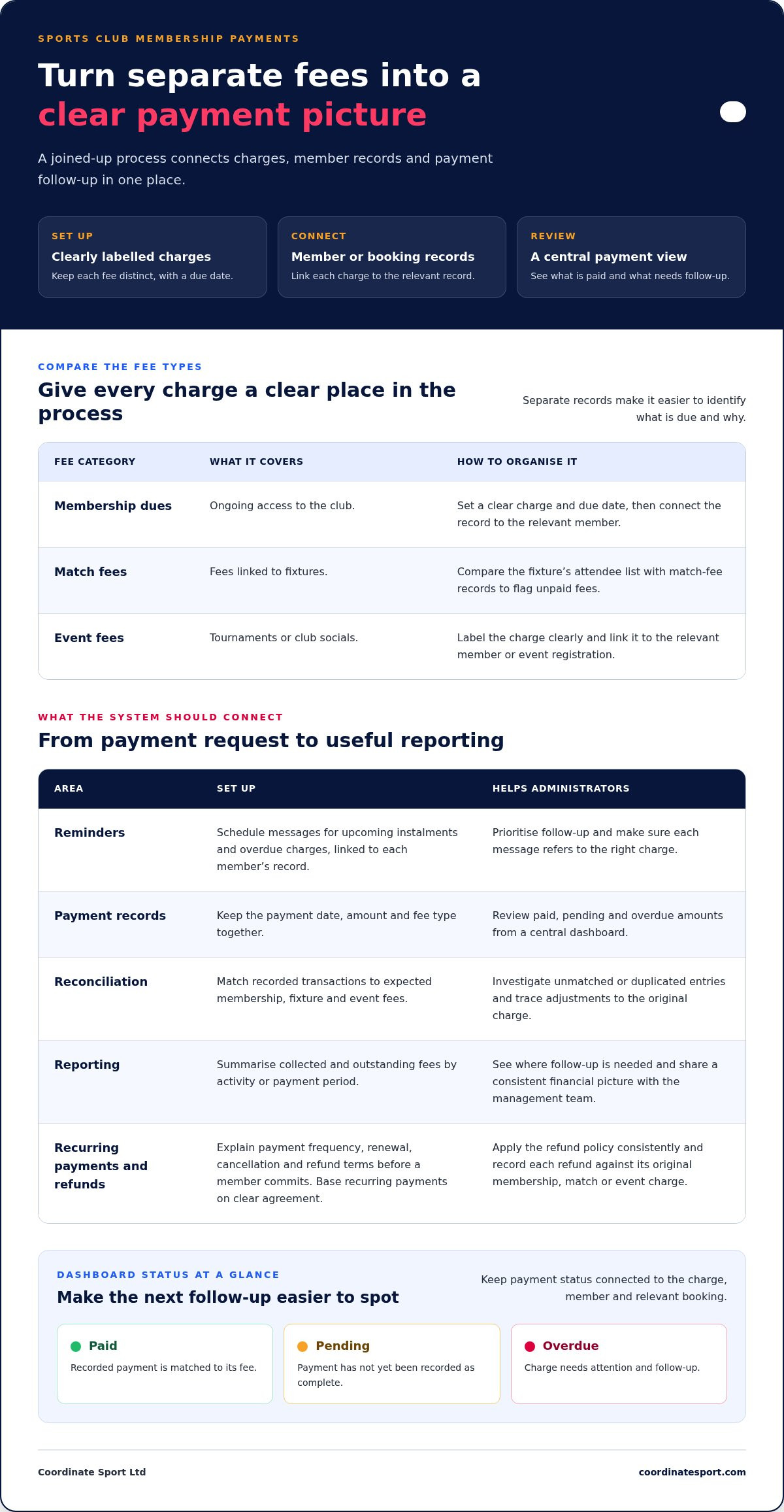
Organise charges by purpose: membership dues for ongoing access, match fees for fixtures and event fees for tournaments or club socials. Give each charge a clear label and due date, then link it to the relevant member or booking. This makes it easier to distinguish a missed match payment from an overdue subscription.
For example, an administrator can compare a fixture’s attendee list with its match-fee records. This helps flag unpaid fees and keeps attendance tracking connected to club management.
Payment reminders and records
Set reminders for upcoming instalments and overdue charges, with messages linked to each member’s record. A central dashboard can show paid, pending and overdue amounts, helping administrators prioritise follow-up instead of checking separate messages or spreadsheets. Keep the payment date, amount and fee type together so each reminder refers to the right charge.
Set a consistent process for recording replies and payment updates. If a member queries a tournament fee, staff can review the relevant charge and its status before responding.
Reconciliation and payment reporting
Reconciliation means matching recorded payments to the fees the club expected to collect. Review transactions against membership dues, fixture fees and event registrations, then investigate unmatched or duplicated entries. Clear labels and an audit trail make it easier to trace an adjustment back to its original charge.
Use reports to summarise collected and outstanding fees by activity or payment period. Club administrators can then see where follow-up is needed and share a consistent financial picture with the management team.
Rules for refunds and recurring memberships
For UK memberships, make payment terms clear before a member commits, including the charge, payment frequency, renewal and cancellation process. Base recurring payments on the member’s clear agreement, and explain cancellation and refund terms in accessible language.
Publish a refund policy explaining how the club handles cancellations, missed sessions and event changes. Apply it consistently, and record each refund against the original membership, match or event charge. This gives staff a clear record when a member asks about a refund or recurring payment.
What Are the Best Sports Club Payment Systems in 2026?
The best fit is a system that matches billing to your club’s membership and activity schedule. Compare how it handles invoices, upcoming payment reminders, receipts and follow-up.
Billing automation and time savings
Automated billing can turn a membership or booking record into a payment request, reducing repeat administration. Look for support for recurring subscriptions and payment plans, so families can spread eligible programme costs across agreed instalments. A player’s record should show the charge, due date and payment status together.
Map your current process before comparing systems. Note where staff create invoices, update spreadsheets and chase payments, then see which steps a platform can automate. For example, an administrator running weekly sessions could review the billing schedule, resolve exceptions and spend less time preparing routine requests. Automation still depends on clear fee rules and accurate member records.
Reminders, invoices and receipts
Choose a system that sends reminders for upcoming instalments and overdue payments. Check that each message identifies the relevant charge and gives the member a clear next step. A reminder linked to an invoice helps a parent distinguish a course instalment from a separate club subscription.
Automated invoicing and email receipts create a record for both the club and payer. Enter invoice information once, then make sure the system records when an invoice is issued and when payment arrives. Receipts should correspond to completed transactions, while unpaid invoices remain visible for follow-up. This separation helps staff answer payment queries without searching unrelated correspondence.
Review reminder settings before using them regularly. Timing, wording and the payment status that triggers a reminder all shape the member experience. A useful system gives administrators oversight and avoids repeated messages after a payment has been recorded.
Payment automation and recovery
Payment recovery starts with identifying failed or overdue transactions and assigning a sensible follow-up action. Look for a dashboard that separates pending, failed and completed payments. Staff can then prioritise a failed instalment, contact the member using the correct record and update the outcome.
Recurring payment plans can support larger programme fees, while automated reminders prompt action on missed instalments. Keep the payment schedule, member agreement and transaction history together so administrators can explain what is due and why. Make sure staff can handle exceptions, such as a changed membership or cancelled booking, rather than treating every account identically.
Compare systems with a practical test: follow a sample registration from invoice to receipt, then simulate an overdue payment. Check whether the dashboard makes the next action clear and whether reports distinguish collected money from outstanding amounts. This workflow reveals whether automation supports payment recovery or simply sends messages.
Online, mobile, and card-present payment collection
Sports clubs can collect fees online, by mobile and in person through one payment workflow. Useful features include integrated bookings, online registration, mobile invoicing and card-present payments for events, coaching and equipment.
Bookings and payment collection
Connect each booking to its payment request, so staff can match a session, event or equipment charge with its transaction. For example, a family booking a coaching session online can pay during registration, while staff can see the booking and payment status together. This reduces the need to compare booking lists against separate payment records.
For mobile coaching, in-app invoicing and payment collection let providers issue a charge during a session. Card-present payments can handle face-to-face transactions, while online payment options support advance bookings. Check that each method is recorded against the correct customer and activity, including adjustments made on site.
A payment gateway can connect the booking process to online card payments. Saved-card arrangements can also support repeat transactions where the customer has agreed to them. Test the process by following a sample booking from selection through payment, then checking that its status updates in the relevant record.
Registration and fee collection
Online registration can collect a session or event fee when a participant signs up. Credit and debit card options give families a direct way to pay during booking. For a tournament, for instance, the registration and fee record can stay together, making completed entries easy to identify.
Manual collection through cash, cheques or bank transfers can make it harder to see the club’s financial position in real time. A WhatsApp message confirming a bank transfer may still need to be matched manually to a participant and activity. Late fees can also make it harder for clubs to cover facility rentals, referees, uniforms and equipment.
Use a consistent route for each payment type. Online bookings can collect fees during registration, while mobile invoicing can handle charges during coaching and card-present options can take payment face to face. Group or merged invoices can help when one payer covers several participants or bookings. Branded invoice PDFs and payment advice can also make charges easier to identify.
Before choosing a system, test an event registration, a mobile coaching invoice and an in-person payment. Check that each transaction appears against the right participant, booking and fee, and that staff can distinguish online, mobile and card-present payments in their records. This reveals whether the process supports everyday payment collection or creates another reconciliation task.
Benefits of online payments for sports clubs
Online processing can give a sports club clearer payment visibility and fewer separate records to maintain. The benefits depend on how well transactions connect with memberships, bookings and accounting.
Online payment processing
For sports clubs, online payment processing records money received against a registration, session or membership. This creates a clearer view than spreadsheets combining bank transfers, cash and booking lists. Check whether payment records identify the activity, payer and transaction status, so administrators can investigate discrepancies and report collected income accurately.
Monthly reporting can help a treasurer compare expected income with completed transactions and outstanding charges. For example, a club preparing its monthly accounts could separate membership receipts from event income, then investigate unmatched entries. Clear records also help management teams see where late fees affect planned spending on facilities or equipment.
Accounting links can reduce repeated data entry between club administration and bookkeeping. A useful integration transfers relevant payment information into the accounting workflow, where the treasurer can reconcile entries and prepare reports without relying on manually copied spreadsheets.
Data protection and payment security
UK GDPR makes personal data handling an important consideration when a platform stores member names, contact details and payment records. PCI DSS concerns payment card data security. When comparing systems, understand how payment information is handled, who can access member records and what controls administrators have over user permissions.
Limit access to staff who need it for tasks such as reconciling payments or managing registrations. Use named accounts rather than a shared login, and remove access when someone no longer performs that role. These steps make it easier to trace who viewed or changed a record.
Sports clubs should also consider fraud risks such as misleading payment requests, disputed transactions and unauthorised account access. Train staff to match unusual payments against a member and booking record before changing account details or issuing a refund. A payment dashboard and transaction history can help administrators spot activity that needs review.
Security and visibility go together. If a parent queries a charge, staff should be able to locate the payment, associated registration and recorded adjustments. Review permissions and reports as part of routine club administration, and make sure the treasurer knows how to flag suspicious or unmatched entries.
Choose a system that supports the club’s real workflow, from registration through accounting. Testing a sample payment and following it into the financial records can reveal where manual steps remain. This gives the committee a practical basis for improving oversight without adding another disconnected spreadsheet.
Comparing all-in-one platforms with payment providers
An all-in-one platform connects payments with bookings, participant records and administration. A standalone payment provider focuses on processing transactions, so compare how each option fits your club’s workflow.
Payment platforms differ in transaction charges and other fees. The total depends on the provider’s pricing model, payment method, card type and any additional services. Compare the full cost structure with your transaction mix, rather than judging by a single headline charge.
Compare the complete workflow
Map a parent’s journey from finding a session to completing payment. An all-in-one platform may connect booking details, participant records and payment status in one place. With a separate provider, check how transaction information returns to the booking system and whether staff must match records manually.
Then test a coach’s day-to-day tasks. Can they see attendance or booking information without handling payment data? Can an administrator identify a refund or failed payment against the right session? These practical steps reveal whether the setup supports operations or creates extra work across separate systems.
Consider mobile use as well. A parent may register and pay by phone, while staff manage bookings on another device. Check that the payment journey works alongside the club’s booking process and that staff can access the records they need. A disconnected mobile checkout may mean extra reconciliation after each session.
Assess charges and flexibility
Compare each provider’s pricing model with the way your club takes payments. Online registration, recurring subscriptions and card-present transactions may be treated differently. Review which transaction types incur charges, how refunds are handled and whether optional features affect the overall cost.
Use your own payment scenarios. For example, compare a course registration paid online with an in-person equipment purchase. Include recurring membership payments if your club uses subscriptions. This makes the comparison relevant to actual transactions, without relying on a single example or headline rate.
Flexibility matters as activities change. A club running sessions, events and equipment sales may need different payment routes. A standalone provider can suit clubs that already manage bookings elsewhere and need payment processing only. An all-in-one system may suit teams seeking connected booking, payment and participant records.
Choose for the club’s workload
Before deciding, ask staff to follow a sample payment from booking through reporting. Record where they need to switch systems, duplicate information or resolve a query. This practical workflow test gives the committee concrete evidence about administration, visibility and charges.
For clubs seeking a joined-up route from registration to payment, explore a connected booking and payment workflow and compare it with your current process.
Coordinate Sport: Sports CRM and booking software
Coordinate Sport brings sports CRM with online booking together for organisations managing activities, registrations and participant records. It’s a practical next step when club administration spans several sessions, courses, camps or events and staff need a clearer way to coordinate bookings.
Online booking and registration support clubs and activity providers running different programmes, while the Activity Management Application helps organise operational activity. The sports staffing software and Sports Activity Provider Staffing Application supports staffing coordination alongside this work. Together, these tools connect programme administration with the people and activities involved.
If you’re reviewing how your organisation manages bookings and activity administration, contact Coordinate Sport to discuss your requirements.
Set your club up for its next stage
The right online sports payments software should support the way your club plans to operate next, not just tidy up today’s administration. Before making a change, agree who will manage payment workflows, what information the committee needs and how staff will use the system during a typical week. This gives your decision a clear purpose and keeps the transition focused.
Coordinate Sport offers Sports CRM and booking software, a Sports Activity Provider Staffing Application, and an Activity Management Application. Together, these offerings support coordination of bookings, activity operations and staffing for sports and activity organisations. Consider whether that combination matches your organisation’s structure and the administration you want to bring together.
Take the next step by outlining your priorities and discussing how they fit your club’s workflow. Contact Coordinate Sport to explore the options for your organisation. A clear plan can put your team in a stronger position to manage activity and move forward with confidence.
Frequently Asked Questions
What payment methods are supported?
Sports payment systems commonly support credit and debit card payments online, by mobile and in person. Some also support saved-card arrangements for repeat payments, depending on the platform and its payment gateway. Before choosing, map how members pay in practice: a parent might register online, while a club may take a card-present payment at an event. Make sure the system records each route against the correct booking or member.
What types of payments can I track with the system?
You can track charges linked to memberships, sessions, courses, events and match registrations. A club might also record a separate equipment charge if its system supports that workflow. Linking each payment to its purpose helps staff respond to queries and review income by activity. Agree consistent charge labels, such as “junior membership” or “tournament entry”, so reports remain easy to interpret.
What is online sports payments software and what features does it offer?
Online sports payments software helps sports organisations collect and manage fees connected with activities and registrations. Depending on the platform, features may include card payments, invoices, payment tracking, reminders, receipts and recurring instalments. Some systems connect transactions to booking and participant records, while standalone payment tools focus mainly on processing payments. Compare features with your club’s workflow, including how staff handle queries, exceptions and reporting.
Which online sports payment platforms are available in the UK?
UK organisations can choose between standalone payment providers, sports management platforms with payment functions, and all-in-one systems that combine bookings with payment administration. Coordinate Sport provides sports CRM and booking software, including online payments and fee collection. To narrow the options, decide whether you need payment processing alone or transactions connected with registrations, customer accounts and activity records. This distinction helps you compare platforms by operational fit.
What payment methods do UK sports payment systems support?
Common options include credit and debit cards, with payments made online, by mobile or face to face using card-present facilities. Support varies between systems and payment gateways. A club may still accept cash and bank transfers, but staff might need to record and reconcile those payments separately. List the methods your members actually use, then check how each appears in the system’s transaction records.
How can a sports club set up online payments for memberships and fees?
Start by listing membership types and their fees. Create registration options that clearly identify the activity and charge, then connect payments to the relevant member record. Set out payment terms for families before registration opens. Finally, test a sample booking from sign-up to completed payment, checking that the correct fee appears and staff can find its transaction record.
Can sports payment software manage recurring subscriptions, instalments and renewals?
Yes, some sports payment systems support recurring subscriptions, instalment plans and renewal schedules. Set the payment frequency, amount and membership period to match your club’s offer, then link the schedule to the member’s account. For example, a course fee could be divided into agreed instalments rather than collected in one payment. Check how the platform displays upcoming charges and handles membership changes.
Which online sports payment software is best for UK clubs, charities and governing bodies?
The best fit depends on how the organisation manages registrations, payments and reporting. A club may prioritise straightforward membership collection, while a charity or governing body may need activity-level oversight and management information. Coordinate Sport combines sports CRM and booking software with online payments and fee collection. Consider whether its wider activity management and reporting functions fit your organisation’s structure and administrative needs.