

The best choice in a LoveAdmin vs Coacha comparison for sports clubs is the platform that fits your club’s compliance needs, member experience and day-to-day processes. Neither name alone makes the decision: the right fit depends on how you manage sign-ups, attendance and communication with members.
Look beyond the feature list. Your software needs to support how your club runs, from organising training groups to keeping administration manageable. This comparison covers compliance, ratings, app access and features, with a closer look at training group sign-ups and attendance tracking.
Use the comparison to identify your club’s priorities, weigh practical trade-offs and decide which platform fits your needs. The key is to assess each one against the same tasks and workflows.
Key Takeaways
- Compare ratings for the management platforms and their mobile apps, while considering which feedback is most relevant to your club.
- Assess how mobile and desktop access fit the way your team handles administration and members.
- Look beyond app availability to the capabilities that support your club’s everyday tasks.
- Match each platform’s features to your priorities, including compliance, training group sign-ups and attendance tracking.
- Use the comparison to clarify whether Coordinate Sport Ltd’s sports CRM and booking software fits the way your organisation manages activities.
Ratings for club-management products and mobile apps
A LoveAdmin vs Coacha for sports clubs comparison should treat ratings as evidence about specific tasks, not as a final verdict. A high score might reflect straightforward booking, helpful support or a positive app experience, but it won’t show whether the platform fits your club’s membership and staffing routines. The page states that 75% of people read online reviews from existing members before joining a gym, making member feedback a useful part of your assessment.
Look for repeated comments about the same task. Several reviews describing an easy renewal process offer a clearer signal than one broad statement praising the software. Separate feedback about the club-management platform from app reviews, since members and administrators may use different features. Note the task described, the reviewer’s role and whether the comment concerns everyday use or support.
How do LoveAdmin and Coacha compare for membership management and renewals? Compare how each handles member records, renewal reminders, payment status and changes to member details. The better fit is the workflow that gives your administrator a clear view of who needs action and when.
Do LoveAdmin and Coacha support UK payments, direct debits and accounting integrations? Compare each platform’s payment methods, direct debit arrangements and accounting connections with your club’s existing process. Trace how payment information moves from booking to reconciliation, so your treasurer can understand the administrative steps involved.
Which sports and club sizes are LoveAdmin and Coacha best suited to? Choose based on operational complexity, not sport alone. Consider membership types, training groups, staff roles and booking patterns. A volunteer-run club managing one activity has different coordination needs from a multi-team club with several schedules.
Review club management costs against the tasks you need the software to handle. The price depends on the case and is provided after a quote request. Compare the factors that shape the total, such as required features, payment arrangements and the number of people managing the platform. Include staff time spent on bookings, renewals and attendance when weighing overall value.
What are the pros and cons of switching a sports club from LoveAdmin to Coacha, or vice versa? A switch may better match your preferred workflows, but transferring member records, payment arrangements and group information takes planning. List the records and processes you rely on, then map each to the new platform before setting a changeover date.
What do UK sports clubs say in reviews about LoveAdmin and Coacha customer support and ease of use? Look for repeated examples, such as how users resolved booking issues or completed routine membership tasks. Reviews can reveal useful patterns, but one person’s experience won’t describe every club’s experience.
Keep your LoveAdmin vs Coacha for sports clubs review consistent by using the same criteria for both platforms:
- Separate platform feedback from mobile app feedback.
- Compare renewal, payment and accounting workflows.
- Assess coach and staff access alongside team and group organisation.
- Map the work involved in moving records and bookings.
Mobile app and desktop access
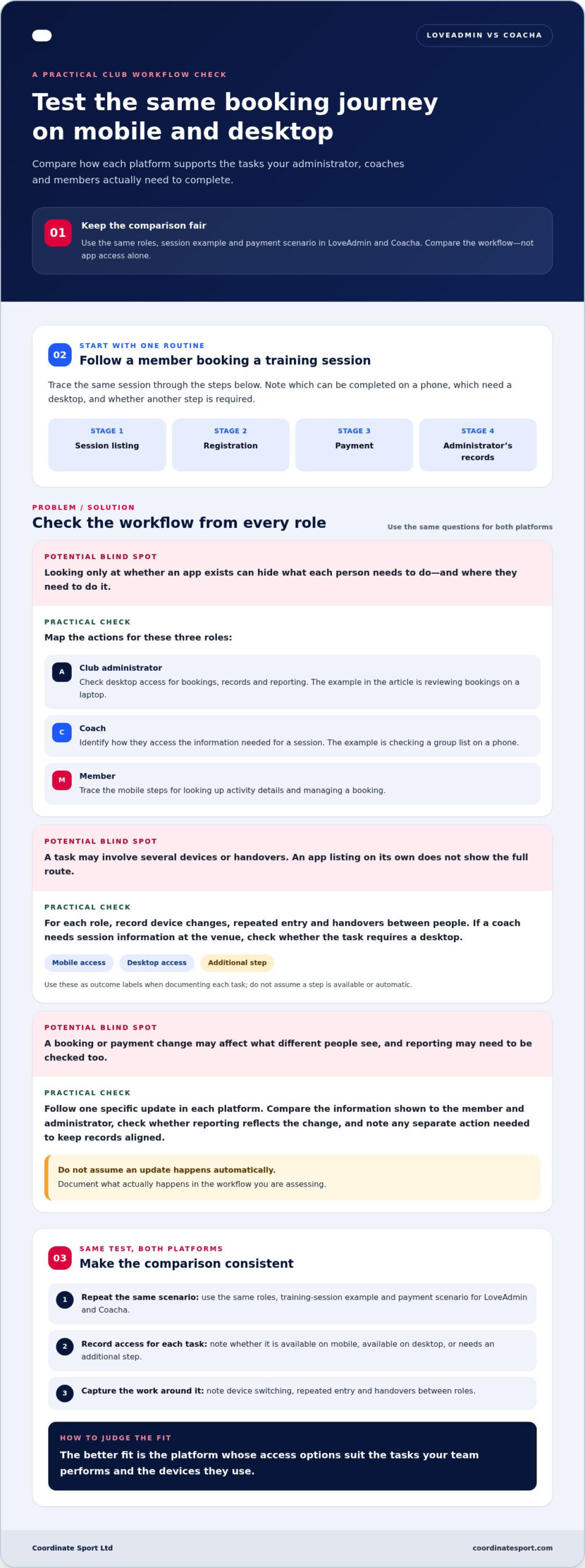
A search for “loveadmin vs coacha for sports clubs” is only a starting point. Compare how each platform supports your club’s actual tasks. Map one routine across a phone and desktop computer, such as a member booking a session and an administrator reviewing the booking. This reveals how different users work and whether they need to switch devices to complete the process.
Start with three roles: club administrator, coach and member. List each person’s actions before, during and after a training session. An administrator might review bookings on a laptop, while a coach checks a group list on a phone. A member might look up activity details or manage a booking. Compare each role’s needs with the access available through each platform.
Then follow the same example in both systems. Trace a session from its listing through registration, payment and the administrator’s records. Note which steps are handled on desktop and which can be completed on mobile. If a coach needs to check session information at the venue, identify whether that task requires a desktop. This makes device switching part of the comparison, not an afterthought.
Review what happens after a booking or payment changes. Follow one specific update and compare the information shown to the member and administrator. Check whether reporting reflects the change, and identify any separate action needed to keep records aligned. Don’t assume a task updates automatically; document what happens in the workflow you’re assessing.
- Administrator: compare desktop access for bookings, records and reporting.
- Coach: identify how they access the information needed for a session.
- Member: trace the mobile steps from finding an activity to managing a booking.
- Whole club: record device changes, repeated entry and handovers between roles.
Keep the test consistent: use the same roles, session example and payment scenario for LoveAdmin and Coacha. Record whether each task is available on mobile, available on desktop or needs an additional step. This turns loveadmin vs coacha for sports clubs into a practical workflow comparison, not a judgement based on app access alone. A platform is a good fit when its access options suit the tasks your team performs and the devices they use.
Mobile app capabilities
Compare LoveAdmin and Coacha through the tasks club members, coaches and administrators need to complete. An app’s presence alone doesn’t show whether it supports your club’s full routine. Choose an example, such as a member booking a training session, then trace the actions from sign-up to attendance. Record which steps happen in the app and which require another route.
Start with the member journey. Can someone find the right session, see relevant details, book a place and review their booking? Consider a parent managing a child’s sessions or an adult member checking their own records. Note where each person needs to sign in, what information they can access and whether the process is clear on a phone. These practical checks reveal how the app supports the member experience.
Next, assess the coach’s view. Use a sample training group and identify whether the app provides the session information coaches need. Can they see who is expected, access the right records and mark attendance in a way administrators can use? Assess each capability separately. A useful app workflow should make responsibilities clear, rather than leave coaches relying on messages or separate lists.
For administrators, map a transaction from booking through payment records and reporting. Check how the platform displays a completed payment, a cancelled place or a member’s changed details. Don’t assume updates happen automatically: follow the same example in both systems and note what appears to the administrator and member. This helps identify duplicated entry and gaps in the club’s record-keeping.
Check subscriptions carefully. If your club collects recurring membership payments, compare the information available about each payment cycle, status and member account. Separate the club’s subscription arrangement from any software subscription, since they are different decisions. Focus on whether administrators can understand the relevant records and act without searching across unrelated screens.
Use a simple capability log for LoveAdmin and Coacha. For each task, mark whether it is available in the app, requires a desktop or involves an additional step. Include these examples:
- A member books a session and finds the booking details again.
- A coach checks a group list and records attendance.
- An administrator reviews a transaction and updates a member record.
- A club officer locates the reporting needed for a routine review.
Finish by asking each user role the same question: which task is hardest to complete on a phone? Compare the answers with desktop workflows before choosing. This keeps the decision grounded in actual sessions, records and responsibilities, not an impressive-looking app screen alone.
What features does LoveAdmin offer for UK sports clubs?
Assess LoveAdmin against the tasks your club needs its software to handle. Start with a weekly training session: a member needs to find it, register and understand what happens next. The club administrator needs a clear view of registrations, while the coach needs a usable group list. Use these tasks to distinguish practical coverage from a long feature list.
Build a feature checklist around your club’s routine. Include membership records, renewals, session bookings, payments, attendance and communications. For each item, note who uses it and what information they need. A volunteer secretary may need to update a member’s details, while a coach needs to identify registered participants before training. This role-by-role view shows which functions matter most.
Consider how LoveAdmin fits your activity structure. A football club with separate junior and adult squads needs clear ways to organise different groups. A dance or martial arts club may manage recurring classes, term enrolments and attendance changes. Compare the platform’s relevant workflows with your own schedule, rather than assuming one club’s setup suits another.
Then follow a booking from start to finish. Use a representative example, such as a new member registering for a course. Trace the information captured, the payment step and the record available to the administrator. Next, follow a returning member renewing or booking another session. This shows how the platform supports both new registrations and ongoing participation.
Assess coach and staff management separately from member administration. List the information each role needs before, during and after a session. For example, a coach may need a current attendance list, while a club officer needs an overview of registrations. Consider how responsibilities and access fit your team’s working practices. Don’t treat a member-facing feature as proof of an equivalent staff workflow.
Use this practical review to structure your LoveAdmin evaluation:
- Membership: map how a member joins, updates details and renews.
- Bookings: follow registration for a session, course or club activity.
- Payments: trace the payment record alongside the related booking.
- Groups: compare how junior, adult or ability-based teams are organised.
- Staff: identify the information coaches and administrators need for each session.
Finally, rank each task by its effect on club operations. If missed attendance records create extra follow-up, prioritise that workflow. If one administrator supports several activities, focus on clear oversight across sessions and groups. This keeps the LoveAdmin comparison grounded in your club’s work, rather than assumptions about features or a generic software checklist.
If session arrangements change, consider how the club would keep its records and communications aligned, and confirm the relevant steps against the platform’s current information. Apply the same check to each priority task: identify the member action, the staff action and the record needed afterwards. Keep unresolved questions visible when comparing options, rather than treating an assumed workflow as a confirmed feature. The guide states that its information reflects what was accurate as of 18 June 2025, so verify details that matter to your club before relying on them. Use your checklist to focus that verification on the activities and roles you manage.
What features does Coacha offer for UK sports clubs?
Assess Coacha against the tasks your club needs its management software to complete. Start with a typical member journey: joining a club, finding a suitable activity, registering and receiving booking details. Then trace what the administrator needs to manage that registration. This reveals whether the platform’s workflow matches your club’s actual process.
Membership management is a useful first test. Take an example such as a junior member moving into an older training group. Identify how your club needs to maintain their details, membership status and activity history. Compare those requirements with Coacha’s member records and administration tools. Include renewals and changes, since a system must support the ongoing relationship, not just the initial sign-up.
Next, map the booking process for a recurring session or course. Note how a member selects the right activity, completes registration and finds the relevant details afterwards. Then consider the administrator’s view: can they manage the participant list and respond to a booking change? A clear comparison follows each action from the member’s first selection to the club’s operational record.
Training groups need their own review. Picture a club with junior and adult sessions, or squads arranged by ability. List the information coaches need before each session, then compare it with Coacha’s group-management workflow. For attendance, identify how a coach records participation and how the administrator uses that information afterwards. This helps distinguish member administration from the practical demands of running sessions.
Payments also deserve a complete workflow check. Follow one booking through its payment step, then identify the record the club needs for administration. If your club uses recurring membership payments, consider how those records fit the renewal process. Focus on your operating requirements and the tasks the software supports, rather than assuming a payment feature covers every arrangement.
Use this checklist to structure a Coacha review:
- Members: compare joining, record updates and renewals.
- Bookings: trace registration for a club activity, course or session.
- Groups: map how coaches and administrators handle different teams.
- Attendance: follow a session record from coach input to club oversight.
- Payments: connect a completed booking with the information administrators need.
Finally, rank each workflow by its effect on club operations. A volunteer secretary may prioritise membership administration, while a head coach may focus on group lists and attendance. Compare Coacha with LoveAdmin using the same club examples, roles and tasks. This consistent approach helps you judge which platform fits your organisation, rather than choosing based on a feature label alone.
Coordinate Sport: Sports CRM and booking software
Coordinate Sport Ltd provides sports CRM and booking software for organisations managing activities, registrations and participants. If your comparison highlights a need to coordinate more than club memberships, consider how an activity management application could support your wider programme.
Use online booking and registration to manage sessions, courses, clubs, camps, holiday activity programmes and events. An organisation running several types of activities can assess its booking and participant-management needs together, rather than focusing solely on a club’s member app. The Sports Activity Provider Staffing Application is also relevant when staffing coordination is part of your operational requirements.
Map your current processes first: identify the activities you run, how people register and which teams need access to participant information. Then compare those needs with the platform’s relevant functions. To discuss how Coordinate Sport Ltd could fit your activity-management requirements, contact Coordinate Sport Ltd.
Choose software that supports your next stage
The right choice in the LoveAdmin versus Coacha decision for sports clubs should support how your organisation plans to operate next, not just ease today’s workload. Before committing, map how new activities, staff responsibilities and changing booking patterns may affect your processes. Identify the task that currently demands the most attention, then define what a better workflow would let your team do.
If your requirements extend beyond club administration, Coordinate Sport offers sports CRM and booking software, a Sports Activity Provider Staffing Application and an Activity Management Application. These options can suit organisations that need to coordinate bookings, activities and staffing as connected parts of their operation.
Set out your priorities, then discuss how they align with your activity operations. Contact Coordinate Sport to discuss your club. Make your next software decision with a clear view of what your club needs now and where it is heading.
Frequently Asked Questions
How do LoveAdmin and Coacha compare for class bookings, attendance, and payments?
Trace the same session in each platform, from booking and payment through attendance records. Check what members, coaches and administrators can do on mobile or desktop, and note any extra steps.
Which sports and club sizes are LoveAdmin and Coacha best suited to?
Choose based on operational complexity, not sport alone. Consider membership types, training groups, staff roles and booking patterns. A volunteer-run club with one activity has different needs from a multi-team club with several schedules.
What are the pros and cons of switching a sports club from LoveAdmin to Coacha, or vice versa?
Switching may better match your preferred workflows, but transferring member records, payment arrangements and group information takes planning. List the records and processes you rely on, then map each to the new platform before setting a changeover date.