

The best Pembee alternatives for holiday activity providers are those that fit the way your programme runs, not simply those with the longest feature list. Compare how each handles support, cancellations, reminders, waitlists, club bookings and calendar scheduling to find a system that makes day-to-day administration easier.
A booking system needs to work for families and staff. A clear booking journey helps parents secure a place, while practical controls help your team manage changes, organise sessions and spot capacity pressures.
Look beyond headline features to the support process and everyday workflows. For holiday camps and after-school clubs, assess which capabilities matter most, where trade-offs could affect operations and how well each platform fits your booking patterns. Use the criteria table and decision guide to narrow your options and choose a system that keeps calendars, bookings and communications aligned.
Key Takeaways
- Compare booking platforms on the support they provide as well as their features, so you can judge how well they’ll help your team manage day-to-day issues.
- Review how cancellations, reminders and waitlists fit your booking process to keep families informed and make better use of available places.
- Match club and camp booking tools to the way your programmes run, including recurring sessions and holiday-period activity.
- Use calendar views to spot scheduling clashes and coordinate sessions, venues and staff more clearly.
- Compare subscription and transaction fees together, then weigh the overall pricing structure against the work each platform could simplify.
Booking platform reviews and customer support
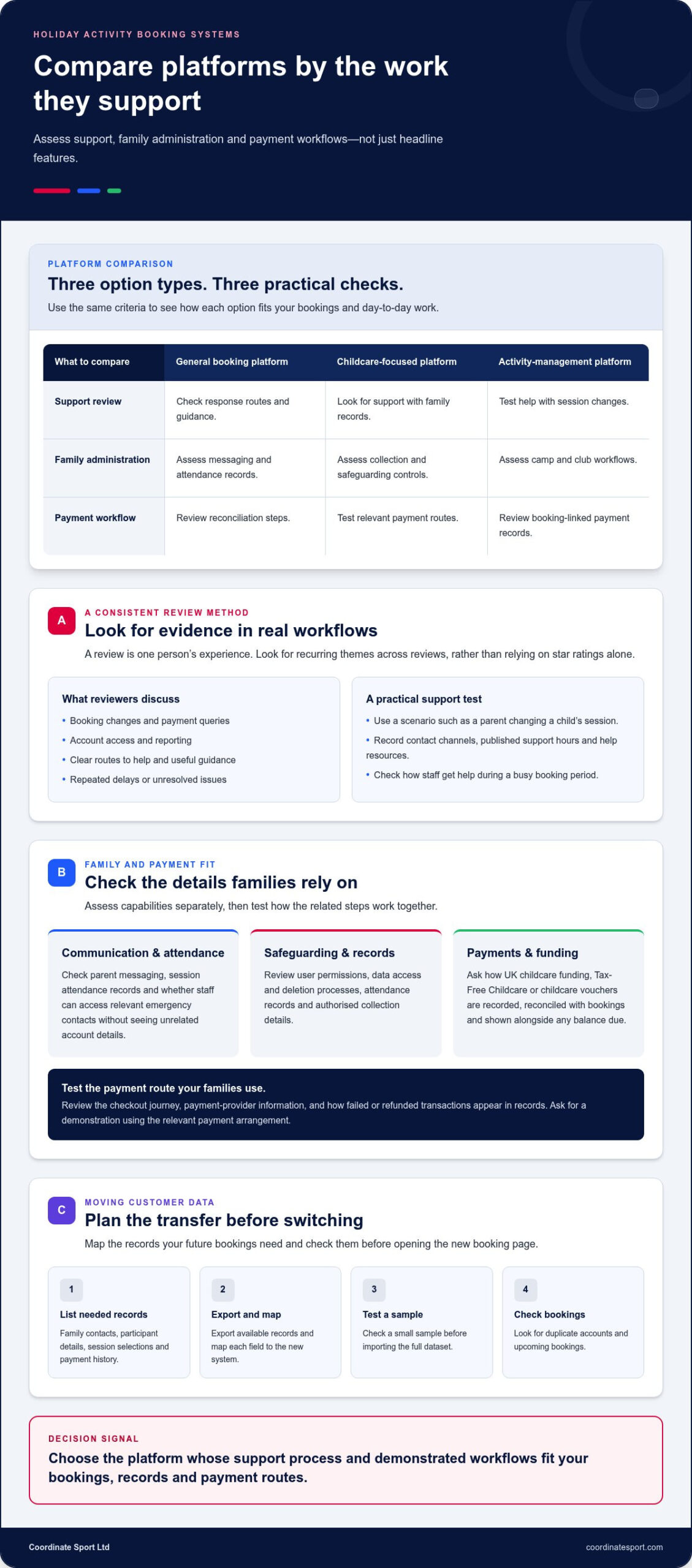
Compare reviews that reflect the work your team handles, not just overall star ratings. A holiday provider processing camp registrations has different needs from a club managing recurring sessions. Look for comments about booking changes, payment queries, account access and reporting. Note whether reviewers describe clear routes to help and useful guidance, or repeated delays and unresolved issues. Treat each review as one experience, then look for themes across multiple reviews.
Use the same practical test for every option. Write down a booking scenario, such as a parent changing a child’s session, and see how the support process explains the steps. Record the available contact channels, published support hours and help resources. Find out how staff access assistance during a busy booking period. These checks make support easier to compare than broad claims such as “friendly support”.
Which platforms offer parent communication, attendance registers and child safeguarding features? Capabilities vary, so assess parent messaging, session attendance records and controls for child information separately. For example, check whether staff can record attendance and access relevant emergency contacts without seeing unrelated account details.
Which alternatives work with UK childcare funding, Tax-Free Childcare or childcare vouchers? Payment routes vary between providers and platforms. Compare how each option records these payments, reconciles them with bookings and displays any balance due from a parent. Ask for a demonstration using the payment route your families use.
What should UK providers check about GDPR, safeguarding and payment security when choosing booking software? Review user permissions, data access and deletion processes, as well as how the system records attendance and authorised collection details. For payments, examine the checkout journey, payment-provider information and how failed or refunded transactions appear in records. Keep these checks together on one assessment sheet.
How do holiday activity providers switch from Pembee and transfer customer data? Start by listing the records needed for future bookings, such as family contacts, participant details, session selections and payment history. Export available records, map each field to the new system and test a small sample before importing the full dataset. Check for duplicate accounts and upcoming bookings before opening the new booking page.
| Option type | Support review | Family administration | Payment workflow |
|---|---|---|---|
| General booking platform | Check response routes and guidance | Assess messaging and attendance records | Review reconciliation steps |
| Childcare-focused platform | Look for support with family records | Assess collection and safeguarding controls | Test relevant payment routes |
| Activity-management platform | Test help with session changes | Assess camp and club workflows | Review booking-linked payment records |
Choose the platform whose support process and demonstrated workflows fit your bookings, records and payment routes.
If your provider works with local funding, include the relevant payment arrangement in your support test. Ask how the platform records that contribution alongside a booking, displays any remaining amount and makes the transaction clear to staff and families. Check that the guidance explains the steps, rather than assuming a general payment help page covers this situation.
Cancellations, reminders and waitlists
A cancellation affects more than one booking. Staff may need to update attendance, confirm a refund, contact the next family and keep session numbers accurate. Compare how each platform handles those steps rather than treating cancellation controls as a minor feature. For example, follow a parent’s cancellation from their family account through to the activity register.
Which holiday club booking platforms support online payments, recurring bookings and waiting lists? Some platforms include all three, but the details depend on the booking setup. Compare payment collection, repeat-session bookings and waitlist handling separately, then test how they work together in a realistic holiday camp scenario.
Start with your organisation’s cancellation rules. Check whether administrators can apply the right policy to a specific session, course or camp. Review how the system records a cancellation and displays any resulting change to the booking balance. A family cancelling one day of a multi-session course, for example, may need different handling from a parent cancelling the whole booking.
Reminders should give parents useful information at the right point in the booking journey. Check whether messages can include the activity date, location, arrival details and preparation notes. Find out how staff identify families who have not received or acted on a message. A reminder with incorrect or missing session details can create extra calls instead of preventing them.
Waitlists need a clear process from vacancy to confirmed place. Check whether staff can see the queue for each session, contact the next family and record their response. Then test what happens if that family declines or does not reply. Clear statuses help staff avoid offering the same vacancy twice.
Use this comparison checklist during a demonstration:
- Cancellation: Can staff locate the booking and record the change?
- Payment: Can they see whether a payment or refund needs attention?
- Reminder: Can a message include the correct activity details?
- Waitlist: Can staff track offers, replies and remaining vacancies?
- Recurring booking: Can families book the intended sessions without duplicating entries?
For a fair comparison, use a sample camp with a recurring booking, a cancellation and a waitlisted place. Follow each change in the parent view and staff records. This shows whether updates stay aligned or need manual correction. Note how many actions and screens are involved, then compare the same scenario across your shortlisted options.
Providers comparing pembee alternatives for holiday activity providers can use this process to assess how well booking changes flow into their daily administration. A joined-up booking workflow can help keep activity registrations and payment records together.
After-school clubs and holiday camps
After-school clubs and holiday camps create different booking patterns. A school-term club may offer repeat sessions, whilst a holiday programme can involve separate dates, full-day places and changing activities. Compare platforms using both examples. Check whether families can book a regular club place and select individual camp dates without staff rebuilding each listing.
The Holiday Activities and Food programme provides activities and healthy food to pupils from Reception to Year 11 who are eligible for pupil premium free school meals. Holiday activity provision seeking HAF funding must include one hour of physical activity per day. Holiday programme requirements can vary, so check the applicable conditions before describing a club as meeting them.
HAF-funded holiday activity provision must include a free meal, although a local council may help arrange one with a local food provider. Reflect meal arrangements in your programme planning, then assess whether registration captures the information staff need to manage each child’s place. For example, booking records should help the team identify which children are attending each activity day.
Inclusion should also shape the booking journey. HAF activity provision must be inclusive for children with Special Educational Needs or Disabilities. Review how families share relevant support information, who can access it and how staff use it to plan participation. For example, a registration form might ask about adjustments and make the response available to authorised staff preparing the session.
For after-school clubs, test the full repeat-booking journey. Can a parent choose a term, select recurring sessions and see which dates are included? Can staff distinguish a regular place from a one-off booking? These details matter when a child attends on selected weekdays or changes clubs during the term.
Use this comparison checklist for both programme types:
- Holiday dates: Can staff publish separate activities and manage capacity for each date?
- Club terms: Can a family register for recurring sessions and review its selected days?
- Child records: Can staff find relevant registration details alongside the booking?
- Attendance: Can registers reflect the specific camp day or club session?
- Programme changes: Can staff update activity details without confusing existing bookings?
Run a sample booking for a holiday camp and a term-time club, following each from parent registration to staff attendance records. This can reveal mismatches between the options families see and the information staff need to deliver each programme. Include a meal arrangement and a support adjustment, then check whether the relevant details are accessible to the staff responsible for that session.
Calendar views and scheduling conflicts
A useful calendar helps staff see what is running, where it is happening and who needs to be there. Compare daily, weekly and monthly views against your actual programme. A holiday provider, for example, might need an overview of activities across several venues and a closer look at one day’s sessions. Check whether staff can switch between views without losing key details.
Test a realistic scheduling clash during each platform demonstration. Add a camp session at a venue, then try scheduling another activity in the same space. See whether the calendar makes the overlap visible and helps staff identify affected bookings. A warning is useful, but the team still needs enough detail to decide which session or resource requires attention.
Venue availability is only part of the picture. A session may also clash with staff assignments, equipment needs or another activity’s set-up time. Use a sample timetable with a shared hall, limited equipment and activities that require preparation. Check whether the calendar helps staff compare those commitments before booking availability is published.
Recurring after-school sessions need a separate test. Create a term-time activity on selected weekdays, then review how dates appear around school holidays or planned closures. Check how staff can edit one session without changing every future occurrence. For holiday camps, test separate dates and activities so families see the right options and administrators can manage each session independently.
Look closely at the information in each calendar entry. A title alone may not show staff whether an activity is full, which venue it uses or who is assigned. Compare how quickly a coordinator can open an entry, identify its status and make a change. Then check whether that change appears in the relevant staff and booking views.
Use these checks to compare calendar functions:
- Views: Can staff switch between a day, week and month overview?
- Filters: Can they focus on a venue, programme or staff member?
- Conflicts: Are overlapping sessions and shared resources easy to spot?
- Recurring dates: Can staff change one occurrence without altering the full series?
- Updates: Do revised times and venues display clearly to administrators?
Finally, test how the calendar fits your existing planning routine. If coordinators use a separate staff timetable, find out whether the platform can share or export scheduling information. Check which updates transfer, how often they appear and whether someone must enter changes twice. This shows whether the calendar reduces duplicate administration or adds another place to maintain.
Choose an option that makes clashes visible before families book and keeps each session’s venue, timing and staffing details easy to manage.
What are the pricing plans and transaction fees for Pembee alternatives in the UK?
Compare the full cost structure, not just the headline subscription. Booking platforms may charge a recurring fee, a cost linked to bookings, payment-processing fees or a combination. For a holiday provider, the total may depend on booking volume, payment method and included features. Record each cost category separately before comparing options.
Start by modelling two real booking patterns: a term-time club with recurring places and a holiday camp with separate dates. Note how many registrations each creates and how families pay. This gives you a consistent basis for comparing subscription charges with booking-related costs, without relying on an abstract example that misses your operating model.
Read plan inclusions line by line. Check whether the package covers the number of programmes you run, staff access, booking records, customer communications and reporting. A lower-cost plan may exclude a feature your team needs, while a higher tier may include tools that support your workflow. Compare the cost of the setup you require, not just the cheapest tier.
Review payment charges separately. Distinguish platform charges from payment-processing charges, then establish whether each applies per transaction, booking or refund. Check how the system handles a cancelled booking, a partial refund and a family paying in instalments. These scenarios can affect the amount retained from a booking and the work needed to reconcile payments.
For the platform under consideration, pricing depends on your requirements and is provided after a quote request. Relevant cost factors include programme scale, required functions and payment workflows. For every option, note whether charges are monthly or annual, whether transaction costs are separate from the subscription and how plan changes affect billing. Compare costs in pounds sterling and record any VAT treatment shown in the quotation.
Use this checklist before deciding:
- Subscription: Record the billing period and included features.
- Transactions: Identify each platform and payment-processing charge.
- Refunds: Check how cancelled or amended bookings affect charges.
- Capacity: Find out how additional programmes or users affect the plan.
- Exit: Review cancellation terms and the process for exporting records.
Then compare expected operating costs with the administration each option removes. A platform that brings bookings, payments and records together may reduce separate reconciliation work, but its value depends on your processes. Test the club and camp examples before choosing a plan, and include any manual tasks that remain.
To assess how a booking setup fits your programme and payment workflow, compare booking options alongside your cost checklist.
Plans may combine a recurring subscription with booking-related charges and payment-processing fees. Subscriptions may be billed monthly or annually, with transaction costs charged separately. Pricing for the platform described is provided after a quote request and depends on programme scale, required functions and payment workflows. Compare options in pounds sterling and record the VAT treatment shown in each quotation.
Coordinate Sport: Sports CRM and booking software
Coordinate Sport brings booking and activity administration together for providers managing holiday programmes and after-school clubs. Its Sports CRM and booking software supports online booking and registration for clubs, camps and holiday activity programmes, helping teams organise programme details and participant bookings in one system.
Consider Coordinate Sport when separate booking processes make activity registrations harder to oversee. Its Activity Management Application and Sports Activity Provider Staffing Application support programme and staffing administration, helping providers assess whether a sports-focused system fits their operations.
To explore how Coordinate Sport could fit your booking and activity workflows, visit Coordinate Sport online.
Choose a setup that supports your next stage
The right booking platform should fit the way your programmes run now and support your next steps. Before deciding, choose a real club or camp workflow and use it to test how staff, families and administrators work together. A focused trial can show whether the system supports your priorities without adding unnecessary steps.
As you compare Pembee alternatives for holiday activity providers, consider whether bringing booking, activity administration and staffing together would suit your organisation. Coordinate Sport offers Sports CRM and booking software, a Sports Activity Provider Staffing Application and an Activity Management Application. Explore whether these tools fit the way your team manages its operations.
Use your comparison criteria to guide the conversation, including the bookings you manage and the tasks you want to streamline. Contact Coordinate Sport to discuss your needs and explore whether its software fits your organisation.
Set your priorities, test them against a real workflow and choose the platform that fits.
Frequently Asked Questions
Which booking platforms are best for small providers, multi-site clubs and seasonal holiday camps?
The best fit depends on how your programme operates. Smaller providers may prioritise straightforward booking and payment workflows, while clubs operating across multiple venues may need clear oversight of teams and activities. Seasonal camps should focus on flexible activity dates and simple programme setup. Compare options using a real booking scenario. For organisations coordinating bookings alongside staffing and activity administration, Coordinate Sport’s software brings these operational areas together.
Which platforms offer parent communication, attendance registers and child safeguarding features?
Capabilities vary by platform. Assess parent messaging, session attendance records and controls for child information separately. Check whether staff can access attendance records and relevant emergency contacts without seeing unrelated account details.
Which alternatives integrate with UK childcare funding, tax-free childcare or childcare vouchers?
Payment routes vary between providers and platforms. Compare how each option records childcare funding, Tax-Free Childcare or voucher payments, reconciles them with bookings and displays any balance due. Ask for a demonstration using the payment route your families use.