

The right ClubSpark alternatives for multi-sport coaching are platforms that fit how your organisation operates. Compare how they manage memberships, payments, websites, multi-sport sessions and coaching venues. For camps, include online registration and payment collection in your review. At busy venues, test how coaches check in pre-booked players and record additional players who arrive on the day.
Look beyond the needs of a single sport. A system may handle memberships well yet create extra work when your team coordinates different activities, coaches, bookings and venues.
Use this practical framework to compare platforms against your day-to-day operations. Assess memberships, competitions, payments and websites alongside multi-sport sessions and venue management. Identify where your current setup slows the team down, then use those priorities to define what a better-fitting platform needs to do.
Key Takeaways
- Compare platforms against your club’s full operating model, including memberships, competitions, payments and website needs.
- Match the system to your organisation’s mix of sports, activities, coaches and venues rather than choosing on one feature alone.
- Assess how bookings, session capacity and venue constraints affect delivery across different disciplines.
- Plan staff workflows for booked participants and players who arrive on the day, so coaches can manage attendance clearly.
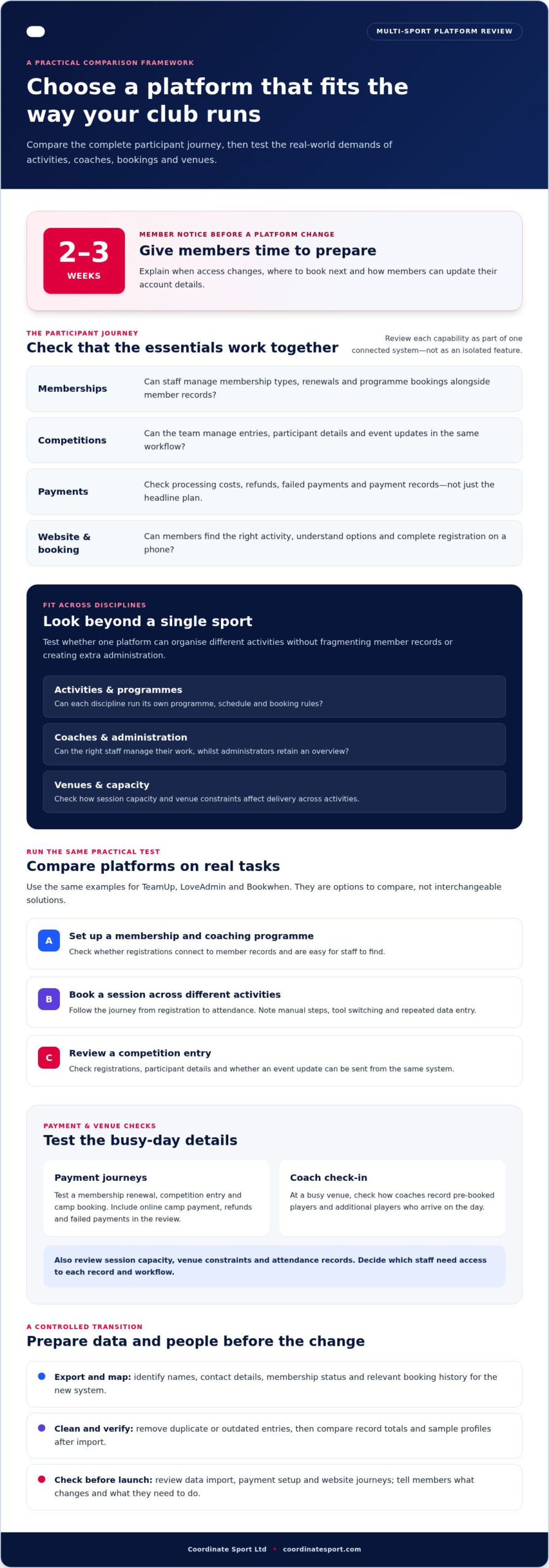
- Give members at least 2 to 3 weeks’ notice before changing platforms, allowing time to communicate the transition.
Memberships, competitions, payments and websites
Compare each platform across the full participant journey, from joining and renewing to booking activities. For multi-sport management, check whether memberships, competitions, payments and the member-facing website work together.
Membership and coaching programme management
Map your membership types, renewal dates and coaching programmes before comparing systems. For example, a club might offer an annual membership alongside bookable weekly sessions. The platform should make both options clear to members and straightforward to administer. Check whether member records connect with programme bookings, so staff can see registrations without reconciling separate lists.
For safeguarding, attendance, waivers and data protection administration, assess whether the platform supports suitable access controls, consent records and clear attendance logs. These tools can help teams manage information consistently. Decide which staff need access and which records each role uses.
Pricing plans and transaction fees
UK platforms have different pricing plans and transaction-fee arrangements. Compare the charging model, payment processing costs, included features and any limits affecting your membership or booking volume. Costs depend on the platform and functions selected, so request a quote to understand the applicable charges.
Test payment handling against real transactions, such as a membership renewal, competition entry and camp booking. Camp payments are made online at booking, so include that journey in your review. Compare how refunds, failed payments and payment records fit your finance workflow, rather than judging by the headline plan alone.
Competition tools should support how your club manages entries, participant details and event communications. Test a realistic example: open a tournament entry, review registrations and send an update from the same system. For the website, check how members find membership options, coaching programmes and competitions, then complete a booking on a mobile device.
Switching platforms also calls for a clear member-data process. Export existing records and identify the fields needed in the new system, such as names, contact details, membership status and relevant booking history. Remove duplicate and outdated entries before import. Then compare record totals and sample profiles to catch mapping errors.
Plan the change around member communication. Give club members at least 2 to 3 weeks’ notice before a platform change, and explain what action they need to take. Share the new booking route, the date access changes and how members can update account details. A short checklist for administrators can track data export, import, payment setup and website checks before launch.
Choosing a platform for different club types
Choose a platform for your organisation’s structure, not just its sport. A volunteer-run tennis club, a multi-activity operator and a national organisation may need different administration, booking and website workflows.
Multi-sport club support
For a club offering tennis, swimming and fitness, check whether one system can organise each discipline without fragmenting member records. Compare how it handles separate programmes, coaches, venues and booking rules. Find out how administrators can view activity across the club, while each sport manages its own schedule and participant information.
Map who handles routine administration, who manages coaching programmes and which staff need oversight. A platform that fits one club may not suit an organisation with several sites or national operations and local teams. Use these differences to define your shortlist.
Sports-specific and general booking software
General booking software may suit a club with straightforward appointments or a small number of classes. The booking flow may be familiar, but sports-specific tasks can require extra administration. Check whether memberships, coaching programmes, participant records and competition entries fit one workflow.
Sports-focused platforms are designed around activity delivery, but their value depends on your organisation’s requirements. Test a realistic journey, such as a member booking weekly sessions across two disciplines, from registration through attendance. Record each manual step. This reveals whether a specialist system reduces handovers or adds features your team will not use.
Comparing ClubSpark alternatives
TeamUp, LoveAdmin and Bookwhen are options to compare, not interchangeable solutions. Run the same practical test in each: set up a membership, publish a coaching programme, take a booking and review the administrator’s view. Compare how well each supports your required tasks instead of relying on feature lists alone.
For each platform, note where staff must switch tools or re-enter information. If your club runs competitions, include an entry workflow. If your organisation offers several activities, test separate schedules and participant lists. These examples give your team a consistent basis for comparison.
List the routine tasks your team needs to manage, such as updating a membership, changing a session and answering a booking query. Assess how easily the relevant administrator can complete each task and find the right record. If governing body requirements shape your processes, include those workflows in your evaluation.
Review the website as part of the booking journey. Prospective members should be able to find the right activity, understand membership options and reach registration without confusion. Test the process on a phone and a computer. For example, ask a colleague unfamiliar with the site to find a junior programme and book it. Note where unclear instructions or navigation slow them down.
Before choosing, score each platform against your essential workflows: membership, coaching programmes, administration, support and website booking. Use the same examples in every demonstration so your decision reflects how your organisation operates.
Multi-discipline session capacity and venues
A multi-sport timetable depends on more than the number of available sessions. Compare platforms against the spaces, equipment, coaches and arrival patterns involved in delivering activities. A tennis court, indoor hall and outdoor pitch each bring different booking constraints. Map these before deciding whether one system can organise your full programme.
Start with a venue-and-session map. For each activity, record the location, usable space, equipment needs, coach allocation and booking window. Then identify potential clashes, such as tennis and a fitness session needing the same indoor hall. Use these as practical demonstration tests: can administrators see conflicts across disciplines and change schedules without losing track of registrations?
Assess capacity at the venue level. A session limit should reflect the space and delivery plan, not simply the number of places an administrator hopes to fill. Compare indoor and outdoor capacity separately, and account for activities sharing changing areas or equipment. For example, if several programmes use one sports hall, check how the timetable represents overlapping setup and pack-down periods.
Weather can disrupt outdoor activities. When facilities lack indoor courts, venue plans cannot rely on moving tennis indoors. Camp play may be suspended during heavy and persistent rain, and refunds issued. Use this scenario to assess how your team would communicate a venue disruption, update participants and record resulting changes.
The Tennis Plus Multi-Sport Camp is recommended for players aged 10-16 years. That example shows why session setup should make the intended participant group clear before registration. Compare how a booking page presents the activity, venue and relevant participation details. Clear information helps families select the right session and gives staff a consistent record to use at check-in.
For each venue, test the full booking and delivery sequence:
- Set up a session with its location, capacity and activity details.
- Check how a change of space affects the timetable and participant information.
- Review the attendance list against the booked session.
- Confirm how staff communicate cancellations or venue changes.
Compare the administrator’s view with the coach’s on-site needs. A programme coordinator may manage several venues, while a coach needs a clear list for one session. Use a real timetable example, such as a tennis activity followed by an indoor sport, to check that scheduling and venue information stay clear from planning through delivery.
Review your programme’s session record to see whether families and staff get the details they need before arrival. Check the booking confirmation, attendance list and any venue-change message together to ensure the information stays consistent. Consider whether the coach can quickly identify attendees and what participants should bring without searching separate records.
Children attending camp should bring water and lunch for their session. Make this instruction easy to find alongside session and venue details, and keep it available to families after booking. In a platform demonstration, test how staff add or update this information and how participants receive it when plans change. This helps you assess whether the system supports scheduling and the everyday preparation needed to deliver sessions smoothly.
Multi-sport and coaching-heavy venue management
Look for a platform that brings sports, venues, coaches and class timetables into one operational view. Activity management, staff coordination and participant records can help teams plan across disciplines.
Multiple sports and venues
Check whether administrators can organise each sport’s timetable and venue without splitting participant records. For example, a club running tennis on outdoor courts and fitness in a community hall needs clear location details, session lists and booking information for both.
Test a venue change, too. Move a sample session to another court, then review what administrators and participants can see. This shows whether schedule updates stay linked to the right activity and venue.
Coaches and class timetables
Compare how the platform assigns coaches to sessions and displays their schedules. A coach covering tennis and another activity needs the correct venue, class and participant list for each booking.
Coaches may need to check in players who booked earlier and add players who arrive on the day. Test that process with a sample class, then check how the updated attendance appears to administrators.
Build a timetable test around a realistic coaching day. Include two sports, a court booking, an indoor session and a coach travelling between venues. Check whether the schedule makes overlaps visible, especially when one coach or space is assigned to more than one activity.
Then review the views available to different staff. A programme coordinator may need an overview of all venues, while a coach needs details for their next class. Use sample roles to check that each person can find the relevant timetable and participant information without navigating unrelated activities.
- Set up one activity at each venue used by the club.
- Assign coaches and review their schedules for clashes.
- Change a court or room and inspect the updated session details.
- Record attendance, including players added on arrival.
Consider how the system handles a late change at a busy venue. If a court becomes unavailable, for example, administrators need to identify affected sessions and communicate revised arrangements. Assess how the platform links each booking to its activity, coach and location.
Use a sample week to assess reporting and oversight. Compare planned sessions with attendance across sports and venues. This can help managers spot scheduling pressure, identify where staff coordination needs attention and plan the next timetable with clearer operational detail.
What are the best UK alternatives to ClubSpark for managing multi-sport coaching?
There isn’t one best platform for every UK coaching organisation. TeamUp, LoveAdmin and Bookwhen are options to assess, but the right fit depends on your programme and operating model. A useful shortlist of ClubSpark alternatives for multi-sport coaching starts with the work your team needs to do, not a feature-based ranking.
Separate essential requirements from preferences before comparing platforms. An organisation coordinating activities at several venues, for example, may prioritise staff scheduling, while a membership club may focus on renewal administration. List the tasks that matter most, then check how each candidate handles them. This keeps your search for ClubSpark alternatives for multi-sport coaching grounded in your team’s daily responsibilities.
Compare TeamUp, LoveAdmin and Bookwhen using the same assessment. Don’t assume the strengths or limitations of one platform apply to another. For each option, assess how clearly it supports your required workflows, where staff must enter information and what administrators can see. Record findings against a real task instead of relying on general descriptions.
Use a scorecard built around your club’s priorities:
- Programme structure: Can staff organise your different activities clearly?
- People and roles: Can the right team members access the information they need?
- Daily administration: How many handovers or repeated actions does each task involve?
- Member journey: Can someone understand the next step after finding an activity?
- Management oversight: Can decision-makers review the information they use to plan?
Test a scenario that reveals operational differences, such as a coaching programme with a venue change and a staff reassignment. Follow the process from the administrator’s view, then consider what the coach needs to know. This shows whether updates are reflected consistently across the working day.
Include administrators and coaches in the assessment. Ask each person to complete a task independently, then note where they need help or duplicate work. A platform may seem straightforward to one role while leaving another without the information needed to act. Record these friction points using the same scorecard.
Review the evidence with your decision-makers. Weight the criteria according to their impact on delivery and identify trade-offs before selecting a system. This gives your organisation a clear basis for choosing between TeamUp, LoveAdmin, Bookwhen and other ClubSpark alternatives for multi-sport coaching.
There is no single best choice. Compare each platform against your programme structure, team roles, daily administration, member journey and management needs. Test the same real-world scenario with administrators and coaches, then weigh the trade-offs against your organisation’s priorities.
Coordinate Sport: Sports CRM and booking software
Coordinate Sport Ltd provides sports CRM and booking software for organisations managing activities across multiple sports and venues. Its Activity Management Application and Sports Activity Provider Staffing Application support programme coordination and staffing workflows.
Use its online booking and registration to manage sessions, courses, clubs, camps, holiday activity programmes and events. Online payments and participant accounts bring bookings and member records into your organisation’s administration. It suits teams looking to manage activity operations through connected tools instead of separate processes.
To explore how Coordinate Sport Ltd could fit your organisation, visit Coordinate Sport Ltd.
Set your next platform decision in motion
Choose a platform by matching your operational priorities to the way your organisation wants to grow. Turn your comparison into a practical shortlist: identify the workflow causing the most friction and make it the first test for each option. This keeps the decision focused on what your team needs to deliver, not features that will not change daily operations.
For organisations considering ClubSpark alternatives for multi-sport coaching, Coordinate Sport offers sports CRM and booking software, an Activity Management Application and a Sports Activity Provider Staffing Application. These tools help sports and activity organisations coordinate bookings, programme administration and staffing.
Bring your priorities and operating model into the next conversation. Contact Coordinate Sport to discuss your needs and explore how its software could fit your organisation. A clear next step can put your team on track for more joined-up activity management.
Frequently Asked Questions
Which sports club management platforms support bookings, payments, memberships and coaching programmes?
Coordinate Sport combines sports CRM and booking software with online registration, payments and participant accounts. TeamUp, LoveAdmin and Bookwhen are also options to assess, but compare each against your workflows rather than assuming they provide the same functions. For example, test whether administrators can manage a membership and coaching programme without creating separate participant records or entering information twice.
Which ClubSpark alternatives integrate with payment providers, accounting software and websites?
Integration options vary by platform, so distinguish built-in functions from connections to external services. Online payment processing or a branded booking site alone does not establish an accounting software integration. Trace a transaction from a member’s booking through to your finance records, noting where staff must transfer information manually. This shows whether a platform’s payment and website tools fit your existing processes.
What should a UK multi-sport coaching provider consider when choosing club management software?
Prioritise the operational information your team needs, not just the booking journey. Decide what managers need to report to funders or commissioners and which participant details staff need for programme oversight. Assign responsibility for keeping those records accurate. Then compare how each platform supports reporting, participant account management and staff coordination, using a real programme as your test case.