

One-off charges can make camp payments harder to track than the main booking. A sports camp payment collection process should show parents the camp fee and any additional charge before they pay, with a clear choice of paying at registration, in instalments or in cash. One-off payments can also cover extras such as kit or tournament entry.
It’s reasonable to ask whether parents will face fees beyond the camp price. The amount due depends on the organiser’s charges, so clear payment information helps families understand what they’re paying for and when it’s due.
This guide explains how to collect camp fees online, send confirmations and reminders, track outstanding payments and manage extra charges. It also covers one-off event payments, helping you keep transactions visible and give families a straightforward route from registration to payment.
Key Takeaways
- Set out payment timing and accepted methods during registration so parents know what to expect.
- Use clear confirmations and reminders to keep families informed about booking status and upcoming payments.
- Track paid and outstanding balances in one organised record to make follow-ups and reconciliation easier.
- Separate optional services and additional charges from the core camp fee so families can see what each payment covers.
- Use one-off payment requests for individual camp places, extras or event entries when a recurring charge isn’t appropriate.
Online camp registration and payment
A well-organised sports camp payment collection process brings registration, participant details and payment together in one online journey. Clear instructions help parents choose a camp, provide the required information and pay smoothly.
Online payment forms
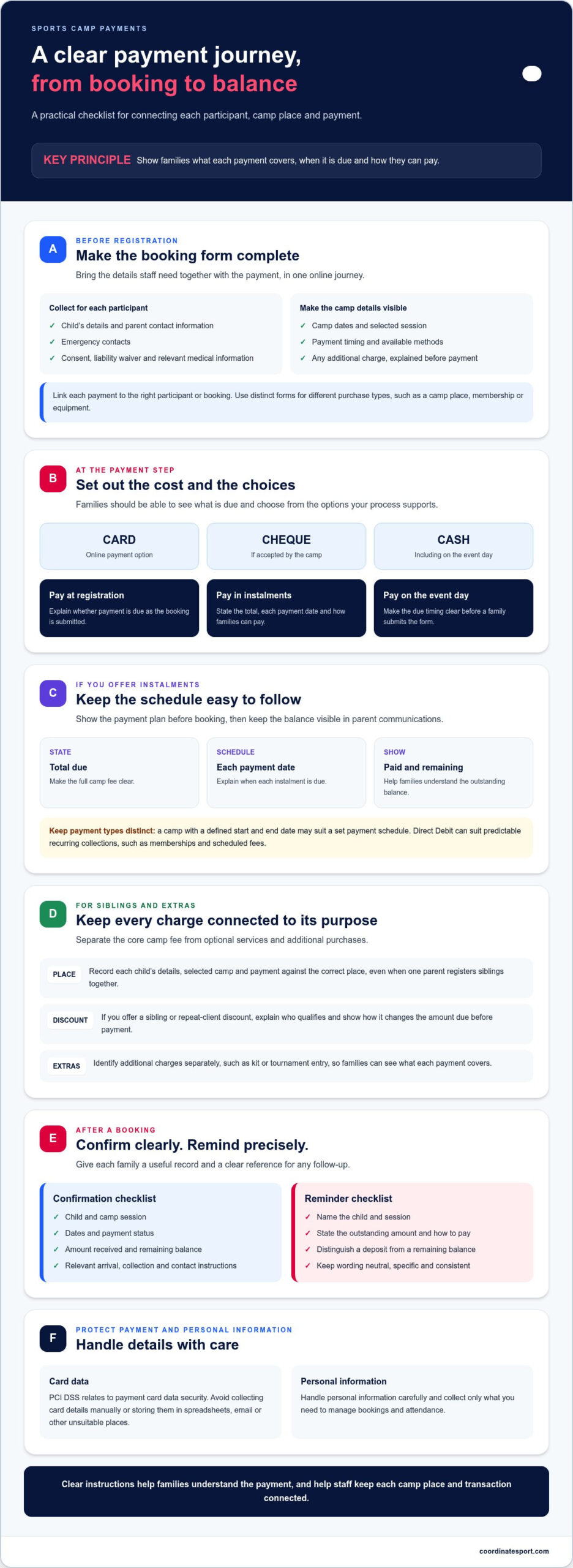
A camp form can capture a child’s details, parent contact information, emergency contacts, a liability waiver and payment. Include consent and relevant medical information with the registration, using clear fields for each item. Parents can then submit the booking and payment together instead of sending details through separate messages. State the camp dates, payment timing and any other information families need before registering.
Online forms also work for event entry, equipment purchases and membership sign-ups. Link each payment to the relevant participant or booking, so staff can distinguish a camp place from a membership or kit purchase. For equipment, identify the item and explain how payment relates to collection or delivery.
Payment methods and data protection
UK sports camps can accept card payments, cheques, cash or a combination of methods. Explain which options are available and whether payment is due during registration, through an agreed plan or on the event day. PCI DSS relates to the security of payment card data, so avoid collecting card details manually or storing them in spreadsheets, email or other unsuitable places. Handle personal information carefully and collect only what you need to manage bookings and attendance.
For sports camp payment collection, parents need clear instructions about payment methods and due dates. Online payment collection lets parents pay during registration, while clubs can also take cash or cheques if their process supports them. Keep instructions consistent across booking pages and confirmation messages, so families know their options before submitting a form.
Instalment payments
Parents can pay camp fees in instalments when the organiser offers a payment plan. Set out the total due, each payment date and how families can pay. Make the schedule visible before booking, then show the amount paid and remaining balance in parent communications. Staged payments can spread seasonal sports fees while giving organisers a clear record of what remains outstanding.
Keep instalment plans distinct from recurring membership payments. Direct Debit can suit predictable recurring club collections, such as memberships and scheduled fees. A camp with a defined start and end date may be better suited to a set payment schedule, with clear instructions for the final balance.
Bookings, discounts and sibling payments
Organise bookings around each participant, even when one parent registers siblings together. Record each child’s details, selected camp and payment against the correct place. If you offer a repeat-client or sibling discount, explain who qualifies and show how it affects the amount due before payment. This makes bookings easier for families to understand and gives administrators a clearer view of places and balances.
For memberships, events and equipment, use a distinct registration or payment form for each purchase type. Keep confirmation details aligned with the booking, including the participant, selected activity and payment arrangement. Clear instructions help parents complete forms accurately and staff manage camp places without mixing them with unrelated transactions.
Parent payment confirmations and reminders
Give each family a clear booking record and a reminder before payment is due. A useful confirmation identifies the child, camp session, amount received and any remaining balance. This helps parents spot errors early and gives administrators a consistent reference for follow-up.
Share the registration link through the club’s usual channels, including social media, so families can go directly to the camp booking page. Make the accompanying message specific: name the activity, explain who the form is for and state whether payment is due immediately or later. If a parent is booking for siblings, ask them to enter the correct details for each child.
Make confirmation messages practical, not promotional. Include the selected session, dates, payment status and the next action, such as completing an outstanding instalment. Add relevant arrival, collection and contact instructions when they’re available. Parents can then refer to one message instead of searching through separate emails for booking and camp details.
Plan reminders around the payment schedule. Before a due date, explain the outstanding amount and how to pay. A follow-up can identify the booking that still needs attention. Keep the wording neutral and precise. Name the child’s session and distinguish a deposit from a remaining balance, so families know exactly what the message concerns.
Payment communication should also support safe handover. During registration, record the parent or carer’s contact details and the collection arrangements for each participant. At sign-in, staff can mark the child as arrived on the day’s attendance list. At sign-out, record who collected them and flag any change from the agreed arrangement for staff attention.
Use a consistent process throughout the camp. Tell parents which channel carries booking updates, where payment reminders will appear and how to report changes to contact or collection details. Keep messages tied to the relevant child and session, especially when families book multiple activities. Clear instructions help prevent confusion between payment queries and attendance updates.
For camps that need registration and payment in the same journey, online booking and registration can connect families with the information needed to secure a place. Build the parent communication around each booking, then keep attendance and collection information organised for the camp team.
Payment tracking and reconciliation
Use one organised record to connect each camp booking with its payments and attendance. A spreadsheet or document can help account for every payment and identify balances that need follow-up.
Payment collection and tracking
Record each participant, camp session, amount due, amount received and outstanding balance. Update the record whenever a payment arrives, so administrators can distinguish fully paid bookings from those needing action. A list of clients who have not yet paid helps focus follow-up. Match each payment to the correct child and booking, rather than relying on a parent’s name alone.
For example, if a family books two sessions, keep each session’s charge and payment status separate. This makes it easier to answer questions about one booking without confusing it with another. A club administrator can start a collection campaign from the Collections tab, then use the resulting records to organise reminders. Keep the list current as payments come in.
Track camp attendance alongside payment status, but don’t treat one as proof of the other. A paid booking does not show whether a child arrived, and an attendance mark does not confirm payment. Give coaches an attendance list for each session and update it as children arrive. Keep emergency contact details accessible to the staff responsible for the group.
Payment reconciliation
Reconciliation means comparing booking records with payments received, then resolving any differences. Review each transaction against its participant and session, and mark it as complete, partial or outstanding. Check for duplicate entries and payments that cannot yet be matched to a booking. Record any action taken, such as correcting a participant reference or following up with a family.
Club administrators can also find collection information in the Transactions and Payouts tabs. Use these views alongside your camp record to compare payment activity with bookings. If a transaction doesn’t match, note the amount, date and booking reference before investigating. Keep adjustments visible instead of overwriting the original entry, so the record shows how the balance changed.
Set a regular review point before camp starts and after each payment deadline. Compare the participant list with paid and unpaid bookings, then share the outstanding list with the administrator handling follow-ups. On camp days, coaches can check attendance against registered children and report changes to the lead organiser. This keeps financial records and session attendance organised without conflating them.
Payment widgets for managing camp services and charges
Separate the core camp fee from optional services and team expenses. A clear payment breakdown helps guardians understand what they’re paying for and why.
Team-specific charges
Use team-specific charges for costs tied to a squad, such as travel, facilities or competition entry. Name the team and explain the expense before asking families to pay. This helps guardians distinguish a squad contribution from the standard camp fee, especially when children attend different teams or sessions.
Organise each charge around the team concerned, then review collections by team. If a payment covers a shared facility cost, explain that purpose in the payment instructions. Keep optional costs separate from required registration payments, so families can see which items apply to their booking. A clear breakdown also gives administrators a consistent record when questions arise.
Payment forms can show a charge alongside the relevant service or team choice. Explain whether families can accept or decline an optional item, and link their response to the correct participant. Avoid grouping unrelated expenses under a vague label such as “extras”. Specific descriptions make the amount easier to understand before checkout.
Late collection charges
If a camp applies a late collection charge, state the scheduled finish time, any grace period and how the charge is calculated. Explain whether it applies per child or per incident, and how the guardian will be notified. Families should see the policy before booking, not only after a late pick-up.
For example, the payment instructions can explain that staff record the actual collection time and pass it to the administrator. The administrator can compare that time with the published policy before applying a charge. Keep a note of the reason and calculation with the child’s booking. This gives staff a clear process and supports accurate communication with parents.
Use an optional service selection for planned early drop-off or extended collection, where offered. Show the relevant days and service choice before payment. Don’t add a charge automatically without explaining what it covers and when it applies.
Disputes, refunds and cancellations
For UK camp bookings, publish cancellation and refund terms before checkout. The outcome depends on the booking terms and circumstances. Explain how parents can request a cancellation or refund, what happens to payments already made and whether a place can be transferred.
Chargebacks and payment disputes can relate to renewals, duplicate charges or fees a parent misunderstood. Reduce confusion by showing the camp name, participant, charge description and payment status in booking communications. If a parent raises a query, compare the transaction with the booking record and the stated terms before responding. Keep the decision and any refund or adjustment recorded against that booking.
When a payment form collects a one-off service charge, make the item and its purpose clear during selection and checkout. Clear descriptions help parents recognise the transaction later and give administrators useful details when reviewing a dispute. Keep refund and cancellation instructions consistent across the booking page and payment confirmation.
One-off camp and event payments
A one-off payment suits a specific purchase, such as a holiday camp place, trial session, kit extra or tournament entry. Keep that transaction separate from recurring membership charges, so families and administrators can identify what each payment covers.
For a summer holiday camp, create a booking option for each camp date or session. Show the activity, who can attend, what the fee covers and when payment is due. Parents can select the right place and pay for it without confusing the purchase with regular club membership.
Use the same approach for individual extras. Give a kit item its own description, and identify the event or entry for a tournament charge. Link each payment to the participant and booking. This gives staff a useful record if a guardian later asks what the purchase covered.
Registration prices can increase on scheduled dates before an event. If you use this approach, display the current price and the date of the next change on the booking page. Families can see how timing affects the amount due and choose whether to register now or later. Keep any price change connected to the relevant camp or event, not to unrelated membership fees.
Set payment terms before opening bookings. For a paid holiday camp, state whether full payment, an agreed deposit or a payment schedule is required before the session begins. Make the deadline and any remaining balance visible during purchase. The organiser can then use consistent payment instructions for each registration and follow up as needed.
A simple setup sequence keeps one-off event payments clear:
- Create a separate booking or payment option for each camp, trial, kit extra or tournament entry.
- Describe the item and identify the participant or event it relates to.
- Display the amount, payment timing and any staged-payment terms before checkout.
- Record the completed transaction against the correct booking for later tracking.
Review the booking page from a parent’s perspective. Check that the event name, selected session, payment amount and confirmation details match. If a family books a place and adds a kit extra, show both purchases separately rather than combining them under a vague label. This makes follow-up and transaction queries easier to handle.
For clubs managing separate camp and event registrations, set up online booking and payment collection for each one-off purchase.
Coordinate Sport Ltd: Sports CRM and booking software
Coordinate Sport Ltd brings booking, registration and payment collection together for sports organisations running camps and events. Its Sports CRM and booking software supports online registration for camps, holiday activity programmes, sessions, courses, clubs and events, alongside customer and participant account management.
If registrations, payments and participant records are spread across separate processes, Coordinate Sport Ltd’s Activity Management Application can bring that operational work together in one platform. Its Sports Activity Provider Staffing Application also supports staffing coordination, keeping the wider programme in view as you organise bookings.
Turn to Coordinate Sport Ltd when you need a connected way to manage online bookings and payments across your activities. Contact Coordinate Sport Ltd to discuss your requirements, or visit coordinatesport.com.
Build a stronger payment process for your next camp
Your next camp is an opportunity to make payment administration part of a well-organised programme, not a last-minute task. Decide how bookings, one-off charges and parent communication should work together, then shape the process around your club’s operations. A clear approach to sports camp payment collection can help families and staff start with confidence.
As your activities develop, connected systems can help keep operational work in view. Coordinate Sport Ltd offers Sports CRM and booking software, an Activity Management Application and a Sports Activity Provider Staffing Application. Each supports a different part of sports organisation, from managing bookings to coordinating activity operations and staffing.
Choose a next step that fits your priorities. If you’re ready to explore how online payments and booking processes could support your camps, contact Coordinate Sport Ltd to discuss payments. Put a clear plan in place, keep your team aligned and move into your next camp with purpose.
Frequently Asked Questions
Are there any fees?
There may be charges beyond a camp’s advertised fee, depending on the organiser’s payment terms. For example, a family might pay separately for optional equipment, event entry or extended collection. Set out each charge and what it covers before booking, then show any additional amount before payment. This helps parents understand the total due and distinguish camp fees from optional purchases.
What banking information should be provided?
Provide the banking details requested through your payment provider’s secure setup process, so it can arrange settlement to your organisation’s account. Keep this separate from parent-facing payment forms: families generally need a payment method, not your club’s bank details. Don’t ask parents to send card numbers or security codes by email or message. For a bank transfer, give families the payment instructions generated for that transaction.
What are the fees for sports camp payment platforms in the UK?
Platform costs vary according to the provider’s pricing model, transaction processing, subscription terms and included functions. Compare the full cost structure against how your camp takes payments, rather than judging by one fee alone. For Coordinate Sport, the price depends on the case and is given after a quote request; relevant factors include the platform requirements and the organisation’s operational needs. Review the terms before choosing.
How should sports camps handle deposits, late payments and overdue fees?
Set a written payment schedule before accepting bookings, including any deposit, balance deadline and process for overdue amounts. For example, a confirmation can state the balance due date and explain how parents can resolve a missed payment. Apply the same approach consistently, and record any agreed change against the booking. Keep payment status separate from attendance, so staff can manage both accurately.
Which sports camp payment software platforms are best in the UK?
The right fit depends on how your organisation runs bookings and handles administration. Compare whether a platform supports camp registration, parent account management, online payments and the records your team needs. Consider how it handles one-off event purchases alongside ongoing club activity. A small camp may prioritise straightforward setup and clear reporting, while organisations running several programmes may need broader activity-management functions.
How can sports camps reduce failed payments and payment disputes?
Reduce avoidable payment problems by making the amount, payment date and purchase description clear at checkout. Ask parents to review the participant and session details before submitting payment, then provide a confirmation they can refer to. Avoid copying card information into records manually. If a parent queries a charge, compare the transaction with the booking details and the terms shown at the time of purchase.
What payment collection process works best for a small sports camp?
A simple process starts with one registration route that captures participant details and links payment to the correct camp place. Choose a clear payment deadline, explain any deposit or instalment arrangement, and keep a record of paid and unpaid bookings. Before camp starts, review the outstanding list and resolve mismatches. Keep optional purchases separate, so a kit or event payment doesn’t obscure the camp balance.